What to Do If Your Microwave Won’t Turn On
Discover safe, practical steps to diagnose why your microwave is not turning on. From power checks to door switches, learn quick fixes and when to call a pro.


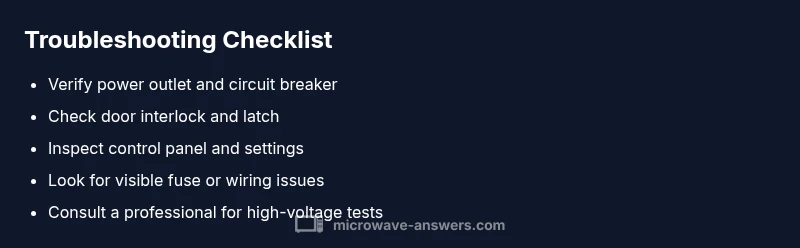
Unplug the microwave and wait 60 seconds, then plug it back in. Check the power outlet, door latch, and control panel for obvious issues. If it still won’t turn on, inspect the door switch and look for a blown fuse. Do not open the magnetron area; high voltages can be dangerous. If unresolved, call a qualified technician.
Quick brand-led overview and practical framing
According to Microwave Answers, a microwave that won’t turn on is typically rooted in a simple power issue, a faulty door interlock, or a blown fuse. The moment you notice the silence, stay calm and adopt a methodical, safety-first approach. This middle section expands the quick answer with concrete steps, common culprits, and a clear path from easy checks to professional help if needed. The goal is to restore function without risking shock or unnecessary repairs, all while keeping the kitchen safe and efficient.
Safety first: unplug, discharge, and don’t rush
Before touching any internal components, unplug the unit from the wall outlet and do not reinsert the plug until you have finished the basic checks. If you’ve been using the microwave on a shared circuit, consider turning off the circuit breaker for 60 seconds to ensure capacitors discharge. Never work with powered electrical parts, and avoid attempting to service the magnetron or high-voltage areas unless you are a trained technician. Safety is the top priority in every troubleshooting step.
Check the power supply and outlet
Start with the simplest check: verify the outlet is delivering power. Plug in a lamp or other device to confirm the outlet works. If the outlet is controlled by a wall switch or is on a GFCI circuit, reset the breaker or GFCI and test again. If the outlet is fine, move to the microwave’s plug and cord for any visible damage. A damaged cord or loose plug can easily prevent the unit from energizing.
Inspect the door latch and door switch
The door interlock is a common reason a microwave won’t turn on. Close the door firmly and listen for a click when you attempt to start. If the door latch seems loose or the switch feels stuck, the microwave may not receive the “start” signal. Replacing a faulty interlock is usually straightforward, but requires care and the right replacement parts. If you’re unsure, it’s safer to skip this step and proceed to professional help.
Examine the control panel and settings
Make sure the control panel isn’t locked in a mode that prevents starting. Check for any displayed error codes and reset the unit according to the manual. If the display is blank, a power or circuit issue is more likely. Beware of accidental button presses that could activate child-lock modes or energy-saving features that mimic a non-responsive unit. Correcting these settings can resolve the issue without hardware work.
Look for blown fuses and visible internal damage
If the power and door interlock checks are clear but the unit still won’t energize, there could be an internal fuse or wiring fault. A blown fuse can prevent power from reaching the control board. Do not replace internal fuses unless you have the exact rating and model information. If you suspect damage to wiring or the fuse, contact a professional to avoid shock or further damage.
How to test with basic tools (where comfortable)
If you have basic electrical testing experience, you can safely test continuity on external components like the door switch with a multimeter. Do not probe live circuits. If you’re uncertain about what you’re doing, skip testing and seek professional help. Remember, working with a live microwave can be hazardous due to high-voltage components and capacitors.
When to replace vs repair and when to call a pro
If the microwave is old, frequently trips circuits, or shows signs of magnetron or control-board failure, replacement may be more cost-effective than repair. In many cases, a professional can diagnose more complex issues such as a failing control board or high-voltage circuit. When in doubt, prioritize safety and opt for pro assistance to avoid injury or appliance damage.
Prevention: keep it safe and reliable for years
Regular cleaning, proper use of cookware (no metal in the microwave), and addressing tripped breakers promptly can extend the life of your microwave. Avoid rough handling of power cords, store the unit in a dry area, and schedule periodic professional checks if you notice recurring issues. These proactive steps reduce downtime and improve safety in your kitchen.
Steps
Estimated time: 60-90 minutes
- 1
Unplug and wait
unplug the microwave and wait 60 seconds to allow capacitors to discharge. Reconnect and test basic power, then proceed to checks.
Tip: Always start with the simplest safe step. - 2
Test the outlet
Plug a lamp into the same outlet or use a multimeter to confirm power delivery. If the outlet is dead, resolve the circuit issue first.
Tip: If the outlet is on a GFCI, reset it and re-test. - 3
Check the door interlock
Close the door firmly and listen for the interlock click. If the door won’t latch properly, replace the interlock before testing again.
Tip: Do not force the door when testing. - 4
Inspect the control panel
Look for error codes or stuck buttons. Reset the unit according to the manual and re-test.
Tip: Avoid using unusual or hacked combinations of buttons. - 5
Assess internal components
If you’re comfortable, check for obvious fuse or wiring issues with the power unplugged. Do not touch high-voltage parts.
Tip: If you see burnt smells or melted insulation, stop immediately. - 6
Consider a multimeter test
With proper knowledge, test door switch continuity and wire continuity to the control board. If unsure, skip this step.
Tip: Never test live components; disconnect power first. - 7
Decide on repair vs replacement
If components are damaged or the unit is old, weigh repair costs against a replacement. Large repairs are often not cost-effective.
Tip: Compare quotes from a few technicians. - 8
Call a professional
If diagnosis remains unclear or you encounter high-voltage components, contact a licensed technician for safe repair.
Tip: With high-voltage devices, professional service is the safer route. - 9
Preventive maintenance
Clean the interior after each use, avoid metal and foil, and inspect cords regularly to prevent future failures.
Tip: Keep the recommended cookware to minimize damage.
Diagnosis: Microwave won't turn on
Possible Causes
- highPower supply issue (outlet, plug, or circuit breaker)
- highDoor interlock switch or door latch fault
- mediumBlown internal fuse or faulty control board
- lowDamaged power cord or plug
Fixes
- easyTest outlet with another device; reset circuit breaker; replace outlet if faulty
- easyInspect door latch for secure closure and audible interlock; replace if damaged
- mediumCheck for a blown fuse on the microwave’s internal fuse holder and replace with same rating; consult a pro if unsure
- easyInspect power cord for cracks or damage; replace if frayed or damaged
Common Questions
Why won't my microwave turn on even after pressing start?
Most often it’s a power supply problem or a faulty door interlock. Verify the outlet and ensure the door closes securely, then check the display for error codes. If unresolved, professional help may be needed.
Most times it’s power or the door interlock. Check the outlet and door before calling a technician.
Is it safe to open the microwave to inspect the interior?
No. The interior contains high-voltage parts. Only a trained technician should open the unit to inspect or replace components.
No—high-voltage parts can cause serious shock. Get a professional.
Can a defective door switch cause no power to the unit?
Yes, a faulty door switch can prevent power from reaching the control board. If you suspect this, a professional replacement is recommended.
Yes. Door switch problems can stop the microwave from powering on.
What should I do if I find a blown fuse inside the microwave?
Replace only with the same fuse rating. If you’re unsure or the fuse blows repeatedly, stop and contact a technician.
If the fuse is blown, replace with the same rating and seek professional help if it happens again.
When is it better to replace the microwave rather than repair it?
If major components like the control board or magnetron are damaged or the unit is aging, replacement is often more economical and safer.
If major parts are damaged or it’s old, replacement is usually best.
Do I need a professional to diagnose every microwave issue?
Not every issue requires a pro, but if you encounter high-voltage components, persistent failures, or safety concerns, professional service is strongly advised.
Not always, but for high-voltage or persistent problems, hire a pro.
Watch Video
Main Points
- Unplug before inspection and test safely.
- Check outlet, door interlock, and control panel first.
- Avoid touching high-voltage components; call a pro if unsure.
- Replace damaged cords and fuses with the same rating.
- Prevent future issues with regular cleaning and safe cookware habits.