How Come My Microwave Won't Turn On? Urgent Troubleshooting Guide
Urgent microwave troubleshooting: power, door interlocks, fuses, and when to call a pro. Practical steps to diagnose and fix safely.


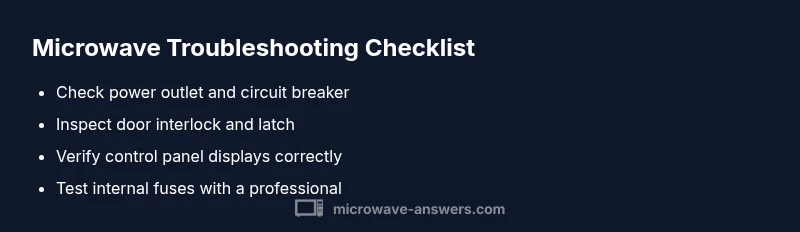
If your microwave won’t turn on, the most likely cause is a power or safety interlock issue. Start with a quick power check (outlet, breaker, and cord) and confirm the door closes properly. If those basics fail, move to interlocks and control panel testing. For most users, these steps fix the problem or clarify a professional repair path.
Why "how come my microwave won't turn on" matters in real kitchens
When a microwave refuses to wake up, you’re often looking at a problem you can fix without a full replacement. If you’re asking how come my microwave won't turn on, the answer is usually a simple power delivery or safety interlock issue rather than a dead oven. In the Microwave Answers approach, the bulk of start-up failures come from four safe, testable areas: the power path, the door interlock circuit, the control panel, and a few internal protection components. This section uses practical, safety-first steps to help you diagnose quickly and decide whether a DIY check is appropriate or if a professional service is required. By staying methodical, you protect yourself from electrical hazards and maximize your chances of getting back to cooking fast.
According to Microwave Answers, most start-up failures are fixable with basic checks that don’t require heavy tools or disassembly. Keep your model information handy, document symptoms, and follow a logical flow: power first, then door interlock, then panel, then internal components if needed.
Quick safety checks you can perform safely
Before you touch any internal components, run a few quick, safe checks. First, unplug the microwave and inspect the power cord for visible damage; do not use it if the cord is frayed. Next, test the outlet with a lamp or phone charger to confirm power supply; if the outlet is dead, reset the circuit breaker or try a different outlet on a different circuit. Check the microwave door: ensure it closes firmly and latches properly, since a faulty door switch is a frequent cause of a non-start. If you notice any burning smell or warm surfaces inside the cabinet when you hover near the vent, stop—this is a safety red flag and deserves professional attention. Finally, ensure the microwave is not overloaded with metal containers or utensils, which can trigger safety interlocks. These checks are designed to be performed with the appliance unplugged and with no risk of electric shock.
Power supply and circuit considerations
Most start failures trace to the power path: the outlet, the circuit, or the cord. Start by validating your home's outlet on a different device to confirm it's live. If the outlet is protected by a GFCI or a circuit breaker, inspect the breaker for trips and reset as needed. On some older kitchens, a dedicated microwave outlet or a shared circuit with a fridge or oven can trip if loads spike. If you find the breaker trips repeatedly when you plug in the microwave, this indicates a circuit-level issue that should be handled by a qualified electrician. If the outlet and cord are fine, you can move to interlocks and internal components next. In some households, multiple devices on a single circuit can cause a nuisance trip; spreading loads across separate circuits is a practical preventative measure.
Door interlock and control panel: the brain behind start/stop
Even when power is present, the microwave won't start if the door interlock circuit or the control panel is faulty. The door switch (or interlock) ensures the oven only runs when the door is securely closed. A worn or misaligned door latch can prevent that switch from engaging. Listen for a faint click when closing the door; if you don't hear it, the latch may be out of alignment. The control panel, including the keypad and display, can suffer from stuck keys or degraded electronics. If the display fails to light or keys don’t respond, replace or recalibrate the panel. This block includes safe, non-invasive checks first (closing the door firmly, clearing the keypad), and only move to replacement if simple checks don’t restore function. If you suspect interlock failure, a service technician is required because replacement involves opening the cabinet and disconnecting high-voltage circuits.
Internal components: fuses and boards
The high-voltage circuitry inside a microwave is designed with protective fuses and a thermal fuse. If any of these components fail, the oven will not power on. Visual diagnostics alone can be inconclusive, so a professional appliance technician usually uses a multimeter to test for continuity and ratings. Replacing internal fuses without proper knowledge can cause microwave damage or injury. In some cases, a failed control board can prevent the display from lighting and the unit from starting, even when power is present. If you hear a hum or see flickering lights, these symptoms point toward a more complex electrical fault that requires service. Remember: internal repairs are not usually safe for the average homeowner and should be handled by trained technicians.
Reading symptoms: No display vs hum vs noises
A non-start can present as no display, no light, or a small hum. No display with keypad responsiveness indicates a panel or control-board fault rather than a power issue. If the unit lights up but makes no noise when pressing start, the interlock or relay chain may be defective. A constant buzzing or sizzling near the back of the unit strongly suggests high-voltage or magnetron problems, which require immediate service. Paying attention to what you hear, see, and smell helps narrow down the culprit and avoid unnecessary disassembly. In all cases, document the symptoms with dates and times to share with a technician, and avoid running the unit if you suspect a safety fault.
What to do next: when to call a pro and how to prepare
If basic checks don’t restore function, it’s time to escalate. The Microwave Answers team recommends contacting an appliance repair professional or the manufacturer’s service line, especially when you suspect interlock, high-voltage, or control-board faults. Prepare your model number, purchase date, and a concise description of the symptoms; this information speeds up diagnosis and parts ordering. For safe home trials, avoid opening the cabinet or attempting component replacement yourself beyond basic unplug-and-inspect steps. If you plan to upgrade, you can compare models that emphasize durability, automatic safety features, and energy efficiency. Finally, if the unit is old or repeatedly failing, consider replacement based on cost of repair versus replacement value.
Steps
Estimated time: 40-60 minutes
- 1
Power cycle the outlet and microwave
Unplug the unit, wait 60 seconds, plug back in, and test the start button with the door closed. If it still doesn’t respond, move to the next check.
Tip: A full power reset clears minor electronic glitches. - 2
Test the outlet and circuit
Plug a lamp into the same outlet to confirm power. If the outlet is dead or the breaker trips, reset or call an electrician for circuit issues.
Tip: Avoid using multiple high-wattage devices on the same circuit. - 3
Inspect the door interlock
Close the door firmly and listen for the latch action. If the latch feels loose or doesn’t click, the interlock may be out of alignment.
Tip: Do not bypass interlocks; they are essential for safety. - 4
Check the control panel and keypad
Look for stuck keys or a dim display. If the keypad responds inconsistently, the panel may need replacement.
Tip: Only perform non-destructive keypad tests. - 5
Assess internal components (if trained)
Qualified technicians test fuses and the control board with a multimeter. Visible signs of damage warrant professional service.
Tip: Internal components require specialized tools and safety protocols. - 6
Decide on next steps
If basic checks fail, plan for professional service or replacement depending on cost and age.
Tip: Keep receipts and model numbers handy for warranty or service inquiries.
Diagnosis: Microwave won't turn on at all; no display, no lights, no sound.
Possible Causes
- highPower issue: outlet or circuit breaker tripped
- highDoor interlock or door latch defective
- lowBlown internal fuse or high-voltage safety fuse
- lowControl board or keypad fault
Fixes
- easyReset the circuit breaker and test the outlet with another device
- easyEnsure the door closes firmly; reseat or replace the door latch if needed
- hardIf power path is intact, have a technician check internal fuses and boards
- mediumConsider professional control-board replacement if symptoms point there
Common Questions
Why does my microwave turn on but the display stays blank?
A blank display often points to a control panel or display fault rather than a power issue. Check the keypad for stuck buttons and verify the display connector during a professional inspection.
If the display is blank, it’s usually a control panel issue. Check for stuck keys and have a tech examine the display wiring.
Is a blown fuse a common reason a microwave won't turn on?
Blown fuses or thermal fuses are possible causes but less common than door interlock or power path problems. A professional should test and replace fuses safely.
Fuses can fail, but you should have a technician check them because replacing fuses involves safety risks.
Can a tripped circuit breaker cause this problem?
Yes. A tripped breaker or a GFCI outlet can cut power to the microwave. Reset the breaker and test the outlet with another device to confirm.
Tripped breakers cut power. Reset them and test a different device to confirm.
Is it dangerous to repair a microwave myself?
Yes. High-voltage components can cause severe injury or shock. Only perform non-hazardous checks; leave internal repairs to trained technicians.
Repairing internal parts is dangerous. Hire a pro for internal work.
When should I replace instead of repair a microwave?
Weigh the cost of repairs against replacement value, considering age, safety features, and energy efficiency. If repairs exceed a practical threshold, replacing may be wiser.
If repairs cost more than a new unit, consider replacement.
What if the microwave beeps but won’t start?
Beeping without starting often points to door interlock or keypad failure. Inspect the door and keypad; if unresolved, professional service is advised.
Beeping without starting usually means interlock or keypad fault; get it checked.
Watch Video
Main Points
- Check power and outlet first, always.
- Door interlock issues are a leading cause of no-start.
- Avoid opening the cabinet; safety-first repairs only.
- If symptoms point to HV components, call a pro.
- Document symptoms to streamline service or replacement decisions.