If Microwave Is Not Working: Step-by-Step Troubleshooting
A practical, urgent step-by-step guide to diagnose and fix a microwave that won't operate, with safety tips, a diagnostic flow, and when to call a professional.


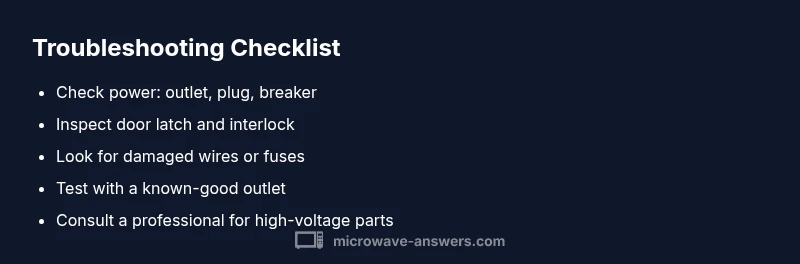
If the microwave is not working, the most likely causes are a simple power issue or a faulty door switch. Start by testing the outlet and circuit breaker, then check the door latch and interlock. Unplug the unit, reseat the plug, and try a different outlet. If it still won’t run, proceed through the diagnostic flow or call a professional.
Immediate safety and power checks
When the microwave is not working, the first steps are safety-oriented and quick. According to Microwave Answers, most urgent issues boil down to power supply or door safety interlocks rather than a blown magnetron. Before you do anything else, unplug the unit, remove any metal dish, and ensure your hands are dry. Then test the wall outlet with another device or with a simple lamp. If the outlet is dead or the circuit breaker tripped, reset or replace as needed. If the outlet is live and the breaker reset but the microwave still does not respond, move on to the deeper diagnostics described in this guide, keeping safety first.
Common causes you can rule out in minutes
Most cases of not working microwaves fall into a handful of causes. Power supply issues (outlet, plug, or circuit breaker) and door interlock problems top the list. A damaged fuse or blown thermal fuse inside the unit can also stop operation, though this is less common and often requires service. Other culprits include a faulty control panel, user settings like a lock function, or a burned wiring harness. By systematically ruling out these items, you can often restore operation without tools. If none of these fixes produce results, it’s time to follow the diagnostic flow to isolate the problem.
How to safely test power and outlets
Begin with the simplest tests to avoid unnecessary disassembly. Plug a known-good device into the same outlet to confirm power. If the outlet is working, try a different outlet on the same circuit; a shared circuit can trip without obvious signs. If you have access to a multimeter, measure the outlet voltage; you should see around 120 V in US homes (or the appropriate standard in your country). If the voltage is abnormal, do not use the microwave and contact an electrician. If the outlet checks out, proceed to inspect the microwave's cord and plug for damage.
Checking the door interlock and latch
Many microwaves refuse to start if the door interlock thinks the door is open. Visually inspect the door latch and seek obvious misalignment or wear. Press the door firmly closed and try starting again. If your unit has a removable panel near the door, you can gently test the interlock switch with a non-conductive tool—never bypass safety features. If the latch feels loose or the interlock clicks inconsistently, replacement by a technician is usually required.
Inspecting internal components safely
Opening the cabinet to look at internal parts can reveal burned wiring, melted insulation, or signs of overheating. Do not touch high-voltage components or the magnetron. Always unplug the microwave and wait several minutes before you touch internal parts. If you notice a burnt smell, sizzling sounds, or visible charring, do not operate the unit; seek professional help. When in doubt, err on the side of safety and schedule a service call.
Diagnostic flow in practice (no mystery, just logic)
Use a symptom-to-cause approach. If there is no power, focus on the outlet and cord. If the display is blank but the light works, rule out the door switch. If the control panel responds but the magnetron doesn’t heat, you may have a faulty main board. The goal is to move from simple to complex: check power first, then door safety, then fuses, then control electronics. Document any codes or blinking lights as you go, since these guide repairs.
Quick fixes for the most common cause (power or door issues)
Common issues like a tripped breaker or a misaligned door latch often resolve quickly. Try these fixes in order: reset the breaker, unplug and replug, reseat the plug, and ensure the door is fully closed. If the unit still won’t start after these checks, proceed to the deeper steps. Remember to stay safe and avoid touching internal components unless you are trained.
Safety tips and common mistakes
Safety reminders: Always unplug before poking inside. Do not operate if you smell burning or see smoke. Avoid using metal containers that can cause arcing. Common mistakes include bypassing door interlocks, ignoring odd smells, or continuing to use a unit that has overheating signs. When in doubt, stop and seek professional help.
Prevention tips and maintenance
To reduce future not-working incidents, perform quick monthly checks: wipe away moisture from the control panel, inspect the door seal for wear, and keep vents clear of dust. Use only microwave-safe containers, and avoid metal racks or foil. Regularly unplugged for storage also helps prevent power surges from damaging the control board. A little care goes a long way toward reliability.
When to seek professional help
If basic power checks and door alignment do not resolve the issue, or if you notice buzzing, sparks, smoke, or a strong burning odor, stop using the unit and contact a qualified technician. High-voltage components can present serious hazards. A professional can safely test the control board, high-voltage capacitor, and magnetron without risking injury or further damage.
Steps
Estimated time: Estimated total time: 60-90 minutes
- 1
Verify power at the outlet
Unplug the microwave and inspect the outlet. Plug in a different device to confirm the outlet is live. If there is no power, resolve the outlet or circuit issue before continuing.
Tip: A lamp test is a quick, safe way to confirm outlet power. - 2
Check the circuit breaker and fuse
Look for a tripped breaker or blown fuse in the panel. Reset the breaker fully and replace any blown fuses as needed. Do not reset or replace while the microwave is plugged in.
Tip: If the breaker trips again, there may be a larger electrical fault—stop and call an electrician. - 3
Inspect the power cord and plug
Check for visible damage on the cord or plug. If you see fraying or scorch marks, do not use the microwave until repaired by a pro. A damaged cord can create shock or fire hazards.
Tip: Wiggle-test the plug gently to ensure a snug connection in the outlet. - 4
Ensure the door is fully closed
Close the door firmly and listen for the latch engagement. If the door feels loose or the latch doesn’t engage, the interlock may be faulty and require replacement.
Tip: Do not bypass the interlock; it is a critical safety feature. - 5
Check for the door interlock behavior
If you can access the interlock switch safely, verify it actuates when the door is closed. Misalignment or wear can prevent startup.
Tip: Use a non-conductive tool to avoid shorting any components. - 6
Test for signs of internal damage
With the unit unplugged and cooled, inspect the interior for burnt wiring or melted insulation. Do not touch the magnetron or high-voltage parts.
Tip: If you smell burning, stop and call a technician. - 7
Reset the control system
Unplug the microwave for 60 seconds, then plug back in and attempt a basic test. This can clear minor software glitches.
Tip: Avoid frequent resets; this is a last-resort quick fix for stability. - 8
Re-test basic operation
Set a simple time and power level and observe whether the unit responds. If there is no response, the issue may be with the control board or magnetron.
Tip: Document any error codes or blinking patterns for the technician. - 9
Plan for professional inspection
If the unit still won’t operate after these steps, arrange service from a qualified technician who can diagnose internal components safely.
Tip: Professional service reduces risk of electrical shock or further damage.
Diagnosis: Microwave won't start or shows no power
Possible Causes
- highPower issue (outlet, cord, or circuit breaker)
- highFaulty door interlock or latch
- mediumBlown fuse or thermal fuse inside the unit
- lowControl board or display failure
Fixes
- easyTest outlet with a known-good device; reset circuit breakers; replace a faulty power cord if damaged
- mediumInspect door latch and interlock for alignment; replace worn components
- mediumCheck and replace blown fuses only if you are trained; unplug before handling
- hardConsult a professional for control board or magnetron issues
Common Questions
Why won't my microwave start even when the door is closed?
A closed door should allow operation. Check the outlet, breaker, and door interlock. If the interlock fails, the microwave may not start, even with a closed door. Resolve power issues first, then inspect the door mechanism or seek professional help if needed.
If the door is closed and it won’t start, first check power and the door interlock. If the interlock is faulty, a technician should inspect it.
There is no display or lights when I press start. What can be wrong?
No display can indicate a power issue, a bad control board, or a blown fuse. Start by checking the outlet and plug, then inspect the control panel for obvious damage. If the display still won’t light, professional assessment is advised.
If the display is blank, check power first. If power is fine but the display remains dark, it’s a sign to get the control board checked.
Can a blown fuse cause a microwave to stop working?
Yes, a blown fuse or thermal fuse inside can prevent operation. This typically requires disassembly and testing by a trained technician. Do not attempt to replace high-voltage fuses unless you’re qualified.
A blown fuse can stop the microwave from working; replacing it should be done by a pro.
Is it safe to open the microwave cabinet to inspect wiring myself?
Only if you are trained and unplugged. High-voltage components can cause serious injury. If you notice burning, smells, or sparking, stop and contact a professional.
Don’t open the cabinet if you’re not trained; high voltage can be dangerous.
What should I do if I hear buzzing, see sparks, or smell burning?
Immediately unplug the unit and avoid using it. These are signs of internal damage or arcing. Have a technician inspect the appliance before attempting future use.
If you smell burning or see sparks, unplug it now and call a technician.
How long should I troubleshoot before calling a technician?
If basic checks don’t restore operation within an hour, or you encounter any high-voltage components, contact a professional. Don’t risk further damage by guessing at complex repairs.
If basic checks fail after about an hour, it’s time to call a pro.
Watch Video
Main Points
- Diagnose from power to parts, not the other way around.
- Safety first: unplug before any inspection.
- Door interlock and outlet issues are the most common failures.
- Call a professional for high-voltage components or after-code errors.