When Microwave Stops Heating: Troubleshooting Guide
Urgent, practical steps to diagnose and fix a microwave that stops heating. Safe checks, common causes, and when to call a professional for reliable results.


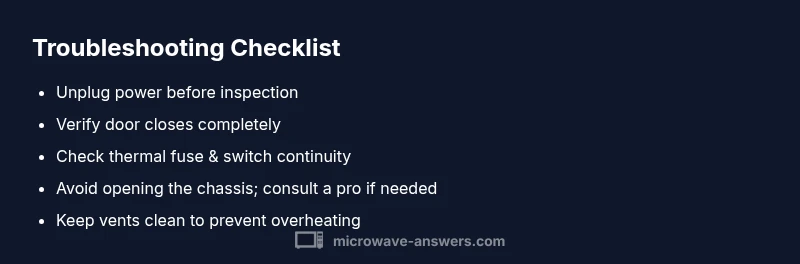
Most heating failures in a microwave are caused by door interlocks or a tripped thermal fuse. Start by unplugging the unit, ensuring the door closes firmly, and testing the door switch. If it still won’t heat, avoid opening the chassis: high-voltage parts can be dangerous and require a qualified technician.
What happens when a microwave stops heating
When the microwave stops heating, you may still hear the fan or see the lights, but food stays cold. This symptom points to issues in the power path, door interlock, or high-voltage components. Understanding the common failure points helps you diagnose quickly and decide whether it’s safe to try non-destructive checks or to call a pro. In many homes, heating failures aren’t simple timer glitches; they reflect hardware that protects you, so approach diagnosis with respect for safety and potential risk. By knowing the likely culprits, you can prioritize checks and avoid unsafe sedsteps. Remember: even when the display works, heating failure is often a sign of a larger electrical issue that warrants careful, methodical testing.
Safety first: immediate steps to take
Before touching any internal components, unplug the microwave and disconnect it from power. Do not use the unit near water or with a damaged cord. Keep flammables away and avoid attempting repairs beyond your comfort level. If you notice an acrid smell, smoke, or a buzzing noise, stop and unplug immediately. Safety gear such as insulated gloves and eye protection can help when you must handle parts, but never bypass safety devices or test high-voltage components with power applied. After power is removed, wait a few moments to ensure capacitors discharge. If the issue persists, schedule service with a qualified technician.
Common non-invasive culprits to check
Start with the simplest possibilities. A loose door latch or misaligned door can prevent heating while leaving controls active. A faulty door interlock switch can stop heat even if the door appears shut. Ventilation blockages or accumulated grime around vents can cause overheating, triggering thermal protection. Check the turntable alignment and ensure no metal objects or foil are inside. If you test these items and the microwave still won’t heat, move to non-destructive electrical checks or contact a pro.
Understanding the microwave's power path
The heating circuit relies on a sequence: power from the outlet passes through the control board, then through relays and a transformer to the high-voltage section, which drives the magnetron. Any break in this path—from a faulty control signal to a blown component—can halt heating. Because several components share the same power path, a failure upstream can look like a magnetron issue. A methodical approach—start with the door switch, then the thermal fuse, followed by HV components—reduces risk and saves time.
How to test door switches, latches, and interlock
Accessing the door interlock involves removing the outer cover and manually inspecting the door switch mechanism. With the unit unplugged, you can often test continuity of the switch with a multimeter. If the switch shows open circuit when the door is closed or if the latch doesn’t seat properly, you may need a replacement. Ensure you follow the manufacturer’s service manual exactly, as improper testing can cause further damage or safety hazards. If you’re unsure, it’s safer to call a trained technician.
Checking the magnetron, high-voltage diode, and capacitor safely
The magnetron and HV components are high-voltage parts that can deliver a dangerous shock. Do not touch exposed circuitry while plugged in, and never bypass safety devices. If you must inspect, unplug the unit, discharge capacitors according to the manual, and check for visible signs of damage such as burns or discoloration. Replace any burnt parts only with manufacturer-approved components. For most homeowners, magnetron or HV component work is a job for a professional.
The role of the control board and sensor failures
Control boards and built-in sensors regulate power delivery to the magnetron. A software fault or failed sensor can prevent heating even when the main power path looks intact. If diagnostics indicate a board failure, replacement is seldom cost-effective for older models, and a professional service is typically required. Understanding this helps you decide whether to pursue repair or replacement.
Quick fixes you can try (non-destructive) and when to stop
First, unplug and plug back in to reset the system; this can clear minor glitches. Ensure the door is fully closed and the latch snaps into place. Check the power outlet and try a different outlet if available to rule out a supply issue. Do not attempt internal repairs beyond surface checks if you’re not trained. If, after these steps, the microwave still won’t heat, stop and seek professional service to avoid risk of electric shock or fire.
Preventive care to minimize future heating issues
Keep the interior and vents clean to aid cooling. Use only microwave-safe cookware and avoid metal or foil. Do not run the unit when it smells burnt, is unusually hot, or shows signs of damage. Schedule periodic professional checkups if your microwave is older, and store the manual for quick reference on safety and service procedures.
Steps
Estimated time: 60-75 minutes
- 1
Power down and safety prep
Unplug the microwave from the wall and, if possible, disconnect it from any power strip. Wait a few minutes to allow capacitors to discharge. Gather basic tools and read the manufacturer’s safety notes before proceeding.
Tip: Always unplug before touching any internal components. - 2
Inspect the door interlock and latch
Visually inspect the door latch and alignment. If the door won’t latch firmly or the interlock seems damaged, this can stop heating. Do not force parts; replace if needed following the manual.
Tip: A failed latch is a common, non-destructive cause. - 3
Test the door switch continuity
With the unit unplugged, access the door switch and check for continuity when the door is closed. If there’s no continuity, replace the switch. If you’re unsure, skip this step and call a pro.
Tip: Use a multimeter and the service guide for your model. - 4
Check thermal fuse and thermostat
Locate the thermal fuse/thermostat and test for continuity. Replace if open; verify that the cooling fins and vents are clean to prevent overheating.
Tip: Thermal components are safety devices—don’t bypass them. - 5
Inspect magnetron and HV components
Visually inspect the magnetron for signs of damage and corrosion. Replacement of HV parts should be performed by a technician due to shock risk and high voltage.
Tip: Never attempt to discharge HV capacitors without proper training. - 6
Assess control board and sensors
If all power-path tests pass but heat still doesn’t occur, the problem may lie in the control board or sensors. Professional diagnostics are recommended.
Tip: A failing control board often signals a broader service need. - 7
Decide on repair vs replacement
Weigh the age, repair cost, and safety implications. For older models with multiple failed parts, replacement might be more economical and safer.
Tip: Ask for a written estimate and warranty on repairs.
Diagnosis: Microwave stops heating during operation
Possible Causes
- highDoor interlock switch or door latch failure
- highThermal fuse or thermal cutoff opened
- mediumMagnetron failure
- mediumHigh-voltage diode or capacitor failure
- lowControl board or sensor fault
Fixes
- easyTest and replace the door interlock switch or ensure door latches properly; verify door closes completely
- mediumCheck/replace the thermal fuse or thermostat; do not bypass safety devices
- hardReplace magnetron only by a professional; not user-serviceable
- hardInspect HV diode and capacitor connections; replace if burnt or shorted, only by a pro
- hardRepair or replace the control board; usually requires professional service
Common Questions
Why does a microwave stop heating after a few seconds?
Common causes include a faulty door interlock or a blown thermal fuse. A quick diagnostic is to verify the door shuts firmly and that the fuse is intact. If the unit still doesn’t heat, professional service is usually required.
Common causes are door interlocks or thermal fuses. If it still won't heat, seek professional repair.
Can I fix a microwave myself?
You can perform basic safety checks like ensuring the door closes properly and the outlet works. For any internal component like the magnetron or HV parts, professional service is advised due to shock risk.
Basic safety checks are okay, but avoid repairing high-voltage parts yourself.
Is it safe to test the door interlock?
Testing door interlocks should be done with the unit unplugged and preferably using the service manual. If you’re unsure, don’t proceed—safety first.
Testing should be done unplugged and with the manual; if unsure, call a pro.
What should I do if I smell burning in the microwave?
A burning smell indicates a potential internal fault. Unplug immediately, do not use the appliance, and contact a technician for inspection.
Unplug immediately if you smell burning and call a professional.
When should I replace my microwave instead of repairing it?
If the unit is old or has multiple failed components, replacement may be safer and more economical than repairing several parts.
If repairs add up with an older model, replacement is often wiser.
How much does it cost to repair a microwave?
Repair costs vary by model and component, but major parts like the magnetron or control board can be expensive. Get a written estimate before approving work.
Costs vary; ask for a written estimate before proceeding.
Watch Video
Main Points
- Verify door interlock first when heating fails
- Do non-destructive checks before opening chassis
- HV components require professional service
- Reset and safe testing can resolve minor glitches
- Regular maintenance reduces future issues