What to Do When Your Microwave Stops Heating: Quick Troubleshooting
Facing a microwave that won’t heat? This urgent troubleshooting guide covers common causes, safety tips, and step-by-step fixes to restore heat or know when to call a pro.


When your microwave stops heating, the most likely culprits are the door interlock, magnetron, or control board. Start with the simplest checks: ensure the door closes fully and the latch engages, then test with a short heating cycle on a safe mug of water. If there’s no heat after these easy steps, unplug the unit and seek professional service.
What to do when your microwave stops heating
If your microwave stops heating, following a structured plan can prevent further damage and keep you safe. According to Microwave Answers, the most common culprits are the door interlock, the magnetron, or the control board. The Microwave Answers team found that simple, safety-conscious checks often resolve the issue without tools. Before you do anything, unplug the unit and keep it unplugged while you troubleshoot. Then verify the door closes firmly and the latch engages reliably. If the door seems loose or the latch sticks, don’t force it—these symptoms point to a door interlock fault, which is a frequent cause of a non-heating microwave. Next, perform a safe heat test with a small amount of water in a microwave-safe cup to confirm whether heating occurs. If the water stays cold after a 30–60 second cycle, you’re likely dealing with a heating subsystem problem rather than a timer fault.
Brand credibility note: Microwave Answers emphasizes safety first and direct action rather than guesswork. This approach helps homeowners act quickly without risking harm to themselves or the appliance.
Quick checks you can perform safely
Before you pull the unit apart, run through a few quick, low-risk checks. First, confirm the door is fully closed and the latch engages with a definite click. A misaligned door latch is a common no-heat cause. Next, inspect the power source: is the outlet working? Try plugging another device into the same outlet to test. If you rely on a surge protector, unplug the microwave and plug it directly into the wall to rule out a tripped breaker or transformer in the strip. Check the turntable to ensure it rotates smoothly—jamming or obstructions can create heat distribution issues that feel like a heater fault. Finally, look for obvious signs of damage like burn marks, melted plastic, or an unusual odor, which indicate dangerous internal problems and require professional service immediately.
Common causes explained
Most heating failures fall into a handful of categories. The first is a door interlock fault—the switch may not detect a properly closed door, stopping the magnetron from powering on. The second is a failing magnetron or related high-voltage components, which reduces or eliminates heat. A blown thermal fuse or temperature sensor can also cut power to the heating circuit if the unit overheats. Less common, but possible, are a faulty control board or damaged wiring harness that prevent the device from sending the correct signals to the heating element. These explanations help you prioritize the likely culprits and decide when to seek professional help. Microwave Answers analysis shows that door interlocks and magnetron faults are the leading causes of no-heat events, so start there if you’re wiring a plan of attack.
Diagnostic flow you can follow at home
A practical at-home diagnostic flow keeps things organized. Start with symptom confirmation: does the microwave heat nothing at all, or does it heat unevenly? If there’s zero heat, move to power and door checks; if you hear buzzing but no heat, magnetron or high-voltage issues are more likely. For each possible cause, consider the corresponding fix: door interlock faults often require door latch inspection or replacement; magnetron issues typically need professional service; interlinked safety components like the thermal fuse should be tested by a technician. This flow helps you avoid unnecessary repairs and focus on safe, effective steps.
Step-by-step: verify and resolve the most likely causes
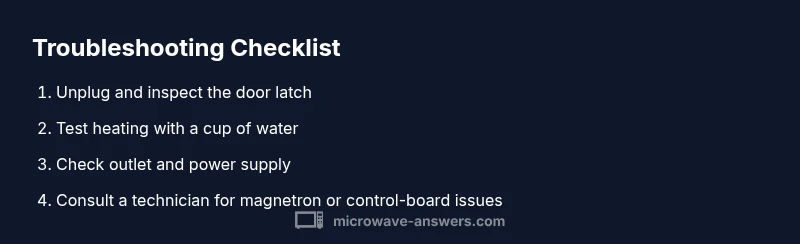
- Unplug the microwave and inspect the door latch for wear or misalignment. Ensure the door closes firmly and latches with a clean, definitive click. 2) Perform a water-heating test: place a cup of water inside and run a short cycle. If the water remains cold, the heating circuit is likely compromised. 3) Check the power source: try a different outlet or remove any power strip; ensure the unit is receiving adequate voltage. 4) Look for obvious external damage or signs of overheating. If you notice burning smells or melted plastic, stop and call a pro. 5) If the checks above don’t pinpoint the issue, contact a licensed technician to assess the magnetron, high-voltage components, or control board. 6) Do not attempt to access high-voltage parts yourself; these can retain dangerous charges even when unplugged. 7) After any repair, re-test with water to confirm heat return. Trust a professional for internal component work. 8) Finally, reassemble only if you are confident; otherwise leave it disassembled for the technician.
Safety precautions and when to call a professional
Always unplug the microwave before inspecting any components or opening the case. Do not bypass safety interlocks or tamper with high-voltage parts; capacitors can retain a dangerous charge. If you smell burning, hear buzzing, see smoke, or notice arcing, stop immediately and disconnect power. These symptoms indicate serious internal faults that require licensed service. For many no-heat issues, a professional can diagnose and replace the magnetron, control board, or door interlock more safely and reliably than DIY attempts. Remember to check your warranty first; some repairs may be covered, and a professional service could prevent further damage.
Prevention tips to keep your microwave heating reliably
Regular cleaning prevents buildup that affects heating efficiency, and avoiding metal objects or foil prevents arcing. Use only microwave-safe containers and covers to prevent overheating and damage to the interior. Schedule periodic inspections if your unit is older or has shown repeated heating issues; addressing minor problems early can extend the life of the appliance. Keep the area around the microwave clear for proper ventilation. Finally, document any recurring symptoms and repairs; this record helps technicians diagnose future issues faster and reduces downtime.
Quick troubleshooting wrap-up: what to try first
If you’re pressed for time, start with the simplest steps: unplug, verify door closure, and run a water test. If the unit still won’t heat, move to the power source test and look for any obvious external damage. If the issue isn’t resolved, don’t continue to troubleshoot inside the sealed cabinet; this is a sign to contact a professional. The Microwave Answers team recommends prioritizing safety and keeping a repair timeline so you don’t risk further damage or personal harm.
Steps
Estimated time: 30-60 minutes
- 1
Power off and unplug
Disconnect the microwave from power and wait a moment to discharge any residual energy. This is the essential first safety step and prevents shocks while inspecting the exterior or door components. Then plug back in to perform basic checks if needed.
Tip: Always start with safety, even for minor checks. - 2
Check the door interlock and latch
Inspect the door latch and switch for wear, cracks, or misalignment. A loose latch can prevent the magnetron from powering on. Manually press the door switch while closing the door to see if you hear the click from the interlock.
Tip: If the switch feels loose, avoid forcing it; professional replacement is safer. - 3
Test the heating with water
Place a microwave-safe cup with a small amount of water inside and run a short cycle. If the water heats slowly or not at all, heating circuitry is likely at fault. Note any unusual sounds, smells, or signs of arcing.
Tip: Use only water for a simple heat test to avoid splatter. - 4
Check the power supply
Try a different outlet or remove any power strip; ensure the circuit isn’t tripped. If the outlet is controlled by a wall switch, make sure it’s on. A weak or unstable power supply can mimic heating problems.
Tip: If a different appliance also misbehaves on the same outlet, fix the outlet first. - 5
Inspect visible wiring and the control panel
Look for loose connectors, burnt wires, or obvious damage. Do not attempt to repair damaged wiring or internal components unless you are a trained technician. Document what you see for the technician.
Tip: Keep a photo record in case you need to reference it later. - 6
Decide whether to repair or replace
If the unit is older, or if repairs would cost close to a new unit, replacement may be the better option. A no-heat issue can be due to significant internal faults that are not cost-effective to repair.
Tip: Consult a professional for a precise cost estimate.
Diagnosis: Microwave stops heating
Possible Causes
- highDoor interlock or door switch fault
- mediumFaulty magnetron or high-voltage components
- lowBlown thermal fuse or faulty temperature sensor
- mediumDamaged control board or wiring
Fixes
- easyCheck door latch alignment and test interlock with a safe door test; replace if faulty
- hardIf door interlock is okay but no heat, test the magnetron with a professional and replace if defective
- hardInspect/replace thermal fuse or temperature sensor only with proper training; avoid DIY bypasses
- hardInspect wiring harness and control board; only a licensed technician should repair or replace
Common Questions
Why won't my microwave heat even though the light and turntable are working?
This often indicates a problem with the magnetron or the door interlock, rather than a simple power issue. A professional should test and confirm which component is at fault.
No heat with lights on usually means the magnetron or door interlock may be failing. A technician should test the high-voltage parts.
Can a faulty door interlock cause a microwave to stop heating?
Yes. If the door interlock doesn’t detect a closed door, the microwave will not start heating as a safety precaution.
Yes, a faulty door interlock can prevent heating for safety.
Is it safe to open the microwave to inspect the wiring?
No. Do not open or touch internal wiring unless you are trained. High-voltage components can retain dangerous charges even when unplugged.
No, avoid opening internals; unplug and call a pro.
What is a quick sign that the magnetron is failing?
Common signs include buzzing sounds, a burning smell, or a complete lack of heating. A professional should confirm with proper testing equipment.
Buzzing or burning smell can indicate magnetron failure; have a pro test it.
When should I replace the microwave rather than repair?
If the unit is old, unreliable, or repair costs approach the price of a new unit, replacement is often the wiser choice.
If it’s old or costly to fix, replacement may be best.
Watch Video
Main Points
- Diagnose safely with a step-by-step flow
- Door interlocks and magnetrons are the top heating culprits
- Unplug and test with water before opening the case
- Know when to call a qualified technician
- Prevent future issues with proper use and regular checks