What’s Wrong with a Microwave When It Stops Heating: Troubleshooting Guide
Urgent, practical guide to diagnosing why your microwave stops heating. Learn quick checks, safe troubleshooting steps, and when to call a professional for repair.


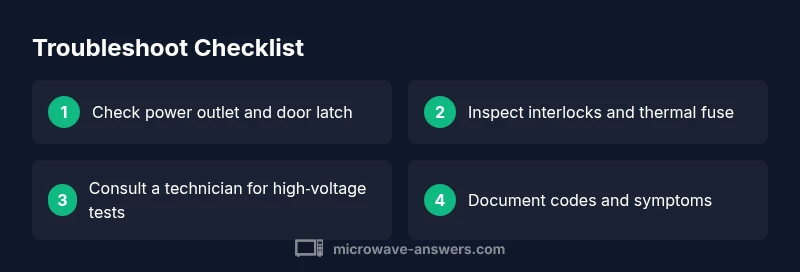
Steps to diagnose: 1) Check power and door latch; 2) unplug and inspect safety components like the thermal fuse and interlocks; 3) Listen for magnetron or transformer signs; 4) If heating still fails, contact a licensed technician for safe repair.
What's happening inside a microwave when it stops heating
According to Microwave Answers, a microwave that won’t heat usually signals an issue with one of a few critical components: the door interlock, the thermal fuse, the magnetron, or the control board. If you’re wondering what's wrong with microwave when it stops heating, begin with the simplest checks before diving into high‑voltage parts. The goal is to rule out user errors and safety faults first, then identify the most likely internal cause. A non‑heating microwave can feel urgent because you rely on it for quick meals, but safety must come first. Unplug the unit before touching any components, and never bypass safety switches. The Microwave Answers Team emphasizes that while some fixes are straightforward, others require professional service to avoid electric shock or further damage. Understanding the typical failure modes and observable symptoms helps you decide whether to attempt a DIY fix or call a technician.
Quick checks you can perform before opening the microwave
Before you suspect a failed internal component, perform a few quick checks that any home cook can safely do. First, ensure the microwave is plugged into a live outlet and that the circuit breaker or GFCI outlet isn’t tripped. If the power is fine, test a different compatible appliance on the same outlet to confirm the outlet is delivering power. Next, verify the door is fully closed and the interlock switches click when you shut the door; a faulty door switch will prevent the magnetron from energizing. Also, inspect the display for error codes or blinking lights, which can indicate a control‑board fault or safety interlock. If you see unusual smells, smoke, or visible arcing, stop immediately and unplug. These steps cover the most common, non‑invasive causes and align with safe troubleshooting practices that Microwave Answers endorses.
Diagnosing the electrical and control components (high‑level guidance)
If quick checks pass but heating still fails, focus on three potential culprits: the door interlock, the thermal fuse/safety limiter, and the magnetron assembly. The door interlock is a mechanical switch that prevents energizing the high‑voltage circuit when the door isn’t properly shut. A worn or misaligned interlock is a frequent reason for a non‑heating condition. The thermal fuse or thermal limiter protects against overheating; if it trips, the microwave will not heat even though the electronics are powered. Finally, the magnetron, transformer, and high‑voltage diodes drive the actual cooking energy; a fault here typically results in no heat and sometimes unusual noises. Because testing these parts often requires specialized tools and is hazardous, use the diagnostic flow in the next section to decide if a professional should handle it.
Decision tree: when to repair vs replace, and how to approach repair safely
If the quick checks reveal a faulty door interlock, thermal fuse, or magnetron, you have three paths. (1) Replace safety components that are user‑serviceable and clearly accessible, ensuring you use the exact part type for your model. (2) If the magnetron or transformer is suspected, do not continue without professional service due to high voltage and radiation risks. (3) For a control board fault, consider factory diagnostics or a qualified technician to avoid misdiagnosis. Always consult the appliance’s service manual and confirm warranty coverage before opening the chassis. Proceed only if you have the right tools and safety training, otherwise call a pro.
Steps
Estimated time: 60-90 minutes
- 1
Power down and unplug
Ensure the microwave is completely unplugged and the surface is dry. Wait a few minutes to dissipate any stored energy. This is the critical safety first step before any inspection.
Tip: Keep hands dry and use insulated gloves if available. - 2
Check the door latch and interlock
Open and close the door firmly to hear the latch engage. If you can access the interlock connectors, reseat them and inspect for damage or corrosion. A faulty interlock is the most common non‑heating cause.
Tip: Don’t bypass or bypass safety switches—this is dangerous. - 3
Inspect the thermal fuse/limit switch
Locate the thermal fuse or safety limiter (often near the magnetron). If you have a continuity tester, check for continuity; if open, replace with the exact part for your model.
Tip: If you’re unsure about the fuse location, consult the service diagram for your model. - 4
Evaluate the magnetron area (do not touch powered parts)
With the unit unplugged, visually inspect for burn marks or damaged insulation near the magnetron. Do not test high‑voltage circuits with a finger; use proper diagnostic tools or a professional kit.
Tip: Never operate the unit with damaged internal components. - 5
Test high‑voltage components only if trained
Use a multimeter as per the service manual to check diodes and transformer resistance. If you’re not confident, skip this step and move to professional service to avoid shock.
Tip: High voltage remains dangerous even when unplugged. - 6
Reassemble and test safely
Reconnect any plugs, reassemble the cover, and perform a brief test with a cup of water. If heat remains absent, stop and schedule service; avoid repeated tests that could worsen the issue.
Tip: Document any codes or symptoms to share with the technician.
Diagnosis: Microwave won’t heat food
Possible Causes
- highBlown door interlock or misaligned door switch
- highBlown thermal fuse or safety limiter
- mediumFailed magnetron or high‑voltage diode/transformer
- lowControl board fault with no heat output
Fixes
- easyTest and replace door interlock or reseat door wiring if accessible
- mediumInspect/replace thermal fuse with the correct part for your model
- hardInspect magnetron assembly and high‑voltage components only if you are trained; otherwise call a professional
- easyReset or reprogram control board after verifying power and connections
Common Questions
Why won't my microwave heat but the light stays on?
This often points to a door interlock issue, a blown thermal fuse, or a magnetron fault. Start with the door latch, then check the fuse. If those pass and no heat remains, a professional should inspect the high‑voltage components.
Usually the door interlock or a safety fuse is at fault. If those checks don’t fix it, a professional should inspect the high‑voltage parts.
Is it safe to use a microwave that won't heat?
If the unit shows signs of arcing, smells burnt, or makes strange noises, stop using it immediately. Do not bypass safety switches. Only conduct basic checks if you feel comfortable; otherwise schedule service.
No—stop using it if you smell burning or hear strange noises. Safety first; call a pro if unsure.
What could cause a no‑heat condition besides the door switch?
Besides the door switch, a blown thermal fuse, a faulty magnetron, or a control board fault can prevent heating. Testing high‑voltage parts requires training and proper tools; consult a technician if you’re not experienced.
Thermal fuse or magnetron faults are common culprits; high‑voltage parts require expert handling.
My microwave sparks when I turn it on. What should I do?
Sparks usually indicate arcing from a damaged waveguide or dirty interior. Stop using the unit, unplug it, and have it inspected by a professional—don’t ignore visible damage.
If you see sparks, unplug it and get it checked; don’t keep using it.
Can a faulty control panel cause heating failure?
Yes, a malfunctioning control board can prevent the magnetron from energizing. If basic checks pass but no heat occurs, a board diagnosis by a technician is recommended.
A bad control board can stop heat even if power is fine.
How do I reset a microwave after a fault?
Unplug the microwave for a few minutes, then plug back in and reset any user‑specific settings. If a fault code appears, refer to the manual or a professional for guidance.
Unplug, wait briefly, plug back in, and reset settings. If codes appear, check the manual or call a pro.
Watch Video
Main Points
- Identify safety switches first to avoid shock or injury.
- Door interlock and thermal fuse are the most common heat‑loss culprits.
- Reserve magnetron tests and high‑voltage work for trained technicians.
- Document symptoms and codes to streamline professional service.