What to Do When Your Microwave Stops Working: A Practical Troubleshooting Guide
Urgent, practical troubleshooting for when your microwave won't start. Learn safe checks, common causes, and step-by-step fixes to get your microwave back in action.


If your microwave stops working, the first steps are safety checks and simple power tests. Before opening the unit, unplug it, inspect the outlet, and confirm the door is fully closed. This guide outlines the most common causes and safe fixes you can try at home, so you know what to do when a microwave stops working.
Immediate Safety First
According to Microwave Answers, safety comes first in every microwave troubleshooting guide. Before you do anything, unplug the appliance and keep your hands dry. Do not attempt to inspect internal components with the unit plugged in. If there is any sign of damaged cord, smoking, or a burnt smell, stop immediately and unplug the outlet. Keep metal objects away from the interior and never operate the microwave without a turntable or with a visibly damaged door seal. Safety gear like insulated gloves and eye protection isn’t mandatory for basic checks, but use common sense. After the unit is unplugged, give it a few minutes to cool, especially if it has been running before the issue appeared. If you must test power, use a known-good outlet or a different appliance to verify the circuit is alive. These initial safety steps reduce the risk of electric shock and fire while you diagnose the issue.
Common Reasons a Microwave Stops Working
Most failures fall into a few broad categories. First, power issues: a tripped circuit breaker, a blown fuse in the outlet, or a faulty power cord. Second, a door interlock or latch problem that prevents the control board from sending a start signal. Third, internal components such as fuses, capacitors, or the control board can fail over time. Fourth, a magnetron or high-voltage diode can fail, especially in older units. Finally, sensor or keypad failures can prevent input from registering. Understanding these categories helps you structure the diagnostic flow and decide when to call a professional.
Quick Checks You Can Do Safely
Start with the basics before disassembling anything. Ensure the microwave is unplugged, then inspect the power cord for cuts or bent prongs. Plug it into a known-good outlet; if the outlet is controlled by a wall switch, make sure the switch is ON. Check the circuit breaker panel for a tripped breaker and reset it if needed. If you use a surge protector, remove it and plug directly into the wall. Confirm the door closes firmly and the latch engages; a loose door can prevent operation. Finally, test with a simple function like the timer or clock to observe any response. These checks are fast and often reveal simple fixes.
Diagnosing Power and Door Issues
Power and door hardware are the most common culprits. A dead outlet or tripped breaker is the easiest fix and often resolves the issue. If power seems fine, test the door interlock switch by gently pressing the door and attempting to start; if the microwave only starts when the door is held in place, the switch or wiring may be faulty. Visual inspection of the door gasket and hinges can reveal wear that affects seal integrity. If you cannot safely access the switch or you see signs of damage, it’s time to call a pro. When in doubt, opt for a professional diagnosis to avoid further damage or safety hazards.
Step-by-Step Fix for the Most Common Cause: Faulty Door Switch
Step 1: Unplug the microwave and locate the door interlock switch on the hinge side. Step 2: Access the switch housing according to the model’s manual or consult a service guide. Step 3: Check for obvious wear, loose connectors, or damaged wiring. Step 4: If you have the proper tools and a replacement switch, disconnect the old part and install the new one, ensuring the wiring is secure. Step 5: Reconnect power and test with the door both open and closed to confirm the switch now signals the control board correctly. Tip: Do not bypass safety interlocks; they prevent dangerous operation. In many cases, door switch replacement is a moderate-difficulty repair that a skilled DIYer can handle, but some units require professional service.
If the Microwave Still Won't Start After Checks
If the unit remains unresponsive after completing the above checks, the problem may reside in higher-risk components such as the high-voltage capacitor, magnetron, or main control board. These parts are not user-serviceable in many models and pose serious safety hazards. Do not attempt to test or replace high-voltage components unless you are a trained technician. At this stage, calling a professional is the safest option. Also consider whether the unit is old enough that replacement could be more economical than repair. A licensed technician can confirm diagnosis and price, and guide you on warranty coverage if applicable.
Safety Tips, Common Mistakes, and Prevention
- Always unplug before any inspection or disassembly; avoid touching metal parts with wet hands. - Do not use damaged cords; replace them to prevent shock or fire. - Never bypass interlocks or attempt to operate with a faulty door seal. - Keep the interior clean to avoid arcing and sensor failures. - Reference the model’s manual for proper fuse ratings and service procedures. Practicing good maintenance helps prevent future outages: clean the interior monthly, inspect seals annually, and schedule professional checkups every few years.
When to Call a Professional and Maintenance Plan
Some issues simply require professional service. If you hear buzzing, smell burning, or see smoke, unplug immediately and contact a technician. If the control board or high-voltage components fail, a qualified technician should diagnose and repair. For preventative care, schedule a professional inspection every few years, especially if you rely on the microwave heavily or have a heavy-use household. Routine cleaning, door seal checks, and careful usage of cookware with proper venting extend the microwave’s life and reduce unexpected outages.
Key Takeaways and Next Steps
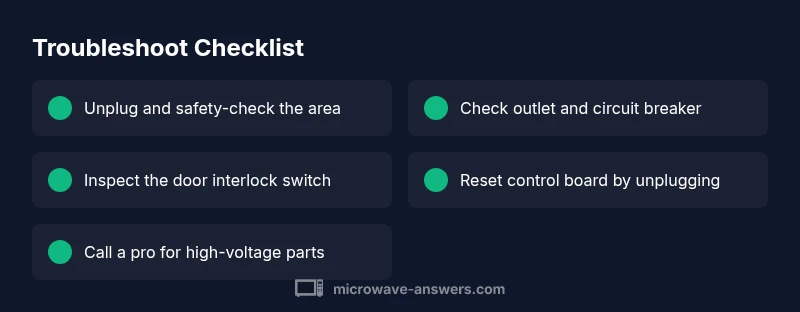
Microwaves can stop working for simple reasons like a tripped outlet or door interlock problems. Start with safety checks and power tests, then move to door and fuse inspections. If basic steps don’t fix the issue, prioritize professional diagnosis, especially for high-voltage components. Regular maintenance minimizes major outages and prolongs appliance life.
Quick Maintenance Routine (Prevention)
- Inspect power cord and outlet monthly. - Wipe the interior, paying attention to the magnetron area. - Use microwave-safe cookware and avoid metal, which can cause arcing. - Have a technician inspect seals and interlocks every 2–3 years. - Keep the unit in a ventilated area to prevent overheating.
Steps
Estimated time: 20-40 minutes
- 1
Safety power-down and outlet check
Unplug the microwave and inspect the power cord for damage. Plug a known-good appliance into the same outlet to verify power. If the outlet is dead, reset the circuit breaker or contact an electrician.
Tip: Always unplug before touching any internal components. - 2
Door latch and interlock inspection
Close the door firmly and test the door button. If the microwave doesn’t respond, try a light press on the latch; a faulty interlock switch can prevent operation.
Tip: Do not bypass interlocks; they are safety features. - 3
Fuse and circuit checks
If you have access to the fuse and it looks burnt or discolored, replace it only if you know the correct rating. Check the house breaker, too.
Tip: A blown fuse or tripped breaker is a common cause and often easy to fix. - 4
Reset the control board
Unplug for 60 seconds to reset the microcontroller. Plug back in and test a basic function like the timer to see if it responds.
Tip: If the display still does not respond, the control board likely needs service. - 5
Professional decision point
If none of the above resolves the issue, call a professional technician to diagnose high-voltage components or board failure.
Tip: Don't attempt high-voltage repairs yourself.
Diagnosis: Microwave won't start or respond to buttons
Possible Causes
- highPower outlet issue
- highDoor interlock switch fault
- mediumBlown fuse or thermal fuse
- mediumControl board fault
- lowMagnetron failure
- lowFaulty display or keypad
Fixes
- easyTest outlet with a known-good appliance or reset circuit breaker
- mediumInspect/replace the door interlock switch if accessible
- mediumCheck for blown fuse or thermal fuse (requires service); replace if you know the rating
- easyReset the microwave's internal control by unplugging for 60 seconds
- hardIf none of the above resolves the issue, consult a professional for control board or high-voltage component diagnosis
Common Questions
Why won't my microwave turn on?
Common causes include a tripped outlet, a blown fuse, or a faulty door interlock. Start with power and door checks before touching internals.
Common causes are outlet issues, a blown fuse, or a door interlock. Start with power and door checks.
Can a microwave be repaired if the door interlock switch is bad?
Yes, a faulty interlock can prevent operation. It may require replacement by a technician.
Yes, a faulty interlock can stop it from starting; it may need a technician.
Is it safe to test the high-voltage components myself?
No. High-voltage parts can cause severe shock even when unplugged. Leave HV components to a pro.
No, high-voltage parts can shock you even if unplugged. Call a pro.
When should I replace vs repair a microwave?
If the cost exceeds a portion of a new unit or the magnetron/control board is failing, replacement is often more economical.
If major components fail or repair costs near a new unit, consider replacement.
What is the first thing I should try?
Unplug, check the outlet, try a different outlet and reseat the door latch to test the basics.
Unplug, check the outlet, and reseat the door latch to test basics.
Watch Video
Main Points
- Unplug and power-test before inspection
- Identify power vs door issues quickly
- Most fixes are simple; reserve high-voltage work for pros
- If in doubt, call a professional early