What Causes Microwave to Stop Working: Troubleshooting
Discover what causes microwave to stop working and how to diagnose safely. Practical checks, a step-by-step repair plan, and prevention tips from Microwave Answers for home cooks and homeowners.


If your microwave suddenly stops working, the most likely causes are a blown thermal fuse, a tripped circuit, a faulty door switch, or a blown magnetron fuse. Start with the basics: unplug for a minute, check the outlet, and verify the door latch is engaging. If it still won’t run, you’ll need deeper diagnostics.
What causes microwave to stop working: A quick overview
When a microwave suddenly goes dark, many homeowners ask: what causes microwave to stop working? The short answer is that most failures are electrical or mechanical rather than mystical. Common culprits include a blown thermal fuse, a tripped circuit breaker, a faulty door interlock, a failed control board, or a blown magnetron fuse. Age, heavy use, and improper venting can accelerate wear on these parts. In this guide, we'll walk through the most likely causes and how to verify them safely, so you can decide whether a quick fix is possible or professional service is needed.
Because microwaves operate at high voltage and include safety interlocks, never bypass fuses or interlocks; this is dangerous and can cause shock or fire. The next sections cover the safe checks you can perform and the diagnostic flow to help you isolate the problem. The aim is to restore function with minimal downtime while protecting you and your family. The Microwave Answers team also notes that in 2026, electrical supply issues remain a top culprit in such scenarios, underscoring the need for careful diagnosis and safe handling.
Safe, quick checks you can perform safely
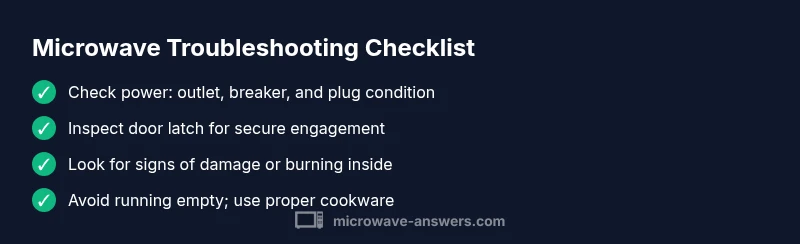
Before we start opening panels, run these non-invasive checks. First, verify the outlet is live: plug in another appliance or use a tester. If the outlet is dead, reset the circuit breaker or call an electrician. Next, unplug the microwave, wait 60 seconds, and plug back in to reset the internal electronics. Inspect the door latch: ensure the door closes firmly and the interlock engages; if the door sticks or the latch seems loose, the microwave won't run. Also check the power cord for damage and ensure there is no moisture around the plug. Finally, if your unit shows no display or lights but sounds strange when plugged, avoid attempting repairs yourself and seek professional help. Keeping the area dry and clear of metal objects around the unit reduces the risk of accidental arcing.
Diagnostic flow: From symptoms to diagnosis
Symptom-driven diagnosis helps narrow down causes quickly. If the microwave won't start or show any display, suspect a power or interlock issue first. If you hear a buzzing or hum but no heat, the magnetron or high-voltage circuit could be at fault. A unit that runs briefly then stops might indicate a thermal fuse or control board failure. Another common sign is arcing or sparking, which often points to a damaged magnetron or faulty waveguide. Use a process of elimination: rule out power issues, then test door interlocks, then assess thermal fuses and control components. Remember, some tests require professional equipment and should not be attempted by beginners—safety first.
Step-by-step fixes for the top causes
-
Check outlet and power source: Unplug, wait 60 seconds, plug back in, and test with a different device. If the outlet is weak or on a switched circuit, consider moving the microwave to a dedicated outlet. Tip: use a grounded outlet and avoid using extension cords.
-
Inspect door interlock and latch: Make sure the door closes completely and the latch engages. A misaligned door can prevent operation. Tip: clean the latch area and ensure nothing blocks the switch.
-
Look for visible signs of damage or burning: A burnt smell, melted plastic, or scorch marks indicate internal damage. Do not continue to use the unit and call a technician. Tip: never bypass safety devices or fuses.
-
Test fuses and thermal protection (professional): Many microwaves have internal fuses that protect against shorts. Replacing these requires a trained technician with the right parts. Tip: document model number and symptoms for efficient service.
-
Consider control board or magnetron issues (professional): If the display is erratic, the control board may be failing; if there’s no heat and sparking occurs, the magnetron could be compromised. Tip: high-voltage repairs should always be handled by pros.
-
When in doubt, schedule a diagnostic with a trained technician: They can safely confirm component health and provide a repair estimate. Tip: request a written assessment and warranty details.
Safety considerations and prevention tips
Safety comes first with any microwave troubleshooting. Always unplug the unit before touching internal components. Do not operate the microwave with a damaged door, frayed cord, or signs of burning. Keep water away from the plug and ensure the appliance rests on a stable, heat-resistant surface. Regularly clean the interior and vents to prevent food particles from affecting sensors or cooling. Avoid running the microwave empty, as this can cause overheating of the magnetron. Fan and vent obstructions can also lead to overheating; check these areas periodically and clear any dust buildup.
When to call a professional and what to expect
If basic checks don’t restore function, or you observe signs of electrical damage, arcing, or a burnt smell, call a professional. A trained technician will inspect power wiring, door interlocks, fuses, control boards, and the magnetron using appropriate safety equipment. Expect a diagnostic fee plus an estimate for any replacement parts. They may offer a repair or replacement option depending on the age of the unit and the extent of damage. The Microwave Answers team emphasizes that professional assessment is essential for high-voltage components to prevent shock or fire.
Steps
Estimated time: 45-60 minutes
- 1
Verify power supply
Unplug the microwave, inspect the wall outlet, and reset the circuit breaker if it tripped. Reinsert the plug firmly and test with a simple timer or another device to confirm power.
Tip: Use a grounded outlet and avoid extension cords. - 2
Check door interlock and latch
Close the door firmly and listen for a click as the interlock engages. If the door feels loose or won’t stay closed, the switch may be faulty and require professional service.
Tip: Do not force the door closed or bypass interlocks. - 3
Inspect for visible damage
Look for burnt smells, melted plastic, scorch marks, or buzzing noises when powered on. Any of these signs means immediate professional attention is required.
Tip: Do not attempt to operate if signs of damage are present. - 4
Assess internal safety components
Fuses and thermal protection guard internal circuits. Replacements should be performed by a qualified technician due to risk of shock.
Tip: Document model and symptoms for faster service. - 5
Evaluate control and heating components
If the unit powers on but doesn't heat, the magnetron or control board may be failing. These parts require specialized testing and replacement.
Tip: High-voltage components should only be handled by pros. - 6
Call for professional diagnostic
If basic checks fail or you notice any alarming signs, schedule a professional diagnostic to determine repair vs. replacement.
Tip: Ask for a written estimate and warranty coverage.
Diagnosis: Microwave won't start or show any power
Possible Causes
- highPower issue (outlet or circuit) or tripped breaker
- mediumDoor interlock or latch fault
- mediumBlown thermal fuse or high-voltage fuse
- lowFaulty control board or magnetron
Fixes
- easyTest the outlet with a known-good device; reset circuit breaker if needed
- easyInspect the door latch alignment and ensure proper closure
- mediumConsult a professional to test and replace fuses or high-voltage components if needed
- hardReplace magnetron or control board only through certified service
Common Questions
Why won’t my microwave turn on even when it’s plugged in?
Common causes include a dead outlet, a tripped circuit, or a faulty door interlock. Verify power at the outlet and test with another device before pursuing further diagnostics.
If your microwave won’t turn on, check the outlet and circuit first, and then inspect the door interlock.
Is it safe to open the microwave to check fuses?
No. High voltage components can cause shock. Only a qualified technician should inspect or replace internal fuses or components.
Don't open the microwave yourself; high voltage parts can be dangerous.
How can I tell if the door interlock is faulty?
A door that won’t latch or re-engage after closing often indicates a faulty interlock; professional testing with proper equipment is recommended.
A door that doesn’t latch might mean the interlock is bad and needs a service tech.
What happens if the magnetron is damaged?
A damaged magnetron usually causes no heating and possible sparking. Replacement is typically expensive and should be handled by a pro.
If the magnetron is damaged, you’ll likely need a professional replacement.
How long does a microwave repair usually take?
Repair duration depends on the issue and parts availability. Simple fixes can be completed in a couple of hours; complex diagnostics may take longer.
Most repairs take a few hours, depending on the problem and parts.
Should I replace my microwave instead of repairing it?
If the unit is old or repair costs near replacement value, replacement may be more economical. A technician can provide a cost estimate.
Sometimes replacement is the smarter choice when repairs are costly.
Watch Video
Main Points
- Power checks first, then interlock tests
- Don't bypass safety features; call a pro for high-voltage work
- Keep maintenance routine to prevent future failures
- Document symptoms to speed up professional diagnostics