Microwave Not Working But Light Is On: Quick Fix Guide
Learn quick, safe steps to diagnose a microwave not working but light is on. This practical guide covers common causes, simple checks, and when to call a pro for repair, with practical safety tips from Microwave Answers.


Most likely, the issue is a faulty door interlock or control board, since the light can stay on while heating fails. Start with a simple power cycle, then check the door latch and outlet, and inspect for a blown fuse. If heating remains absent, contact a qualified appliance technician for diagnosis.
microwave not working but light is on: what it means
When you notice the microwave won’t heat but the light stays on, it’s a distress signal that something beyond the power supply is failing. This scenario is common enough that Microwave Answers has tracked it as a door interlock or control-board problem. The appliance can appear to be functioning—lights, display, and sounds work—yet the heating magnetron fails to produce microwaves. Recognizing this pattern is the first step toward a safe, effective fix. In their analysis, the Microwave Answers team emphasizes that a non-heating symptom paired with a live light is usually an interlock or logic fault, not a simple power issue. Treat this as a diagnostic cue, not a guess, and avoid risky interior inspection. A careful, staged approach minimizes danger and protects your warranty where applicable.
Quick checks you can safely perform
Before calling for service, try a few low-risk steps. First, unplug the unit, wait 60 seconds, then plug it back in to reset the control logic. Next, verify the door is closing firmly and the latch engages properly. A loose or damaged door interlock often prevents heating even when the light is on. Also test the outlet with another small appliance to ensure the circuit hasn’t tripped. If the microwave still won’t heat, you’ve moved from a simple reset to a potential safety or component fault that requires professional help. Remember: never bypass safety interlocks or open the housing to “fix” internal parts. The Microwave Answers team reminds homeowners to prioritize safety and consult an expert when cover panels must be removed.
How to interpret the symptoms: a flow of checks
If the light is on but the oven won’t heat, the issue typically falls into one of a few buckets: door interlock or latch failure, control board or user interface fault, a blown thermal fuse or safety cutout, or a magnetron/high-voltage problem. Start with the least invasive checks and work toward the more complex failures. This approach aligns with standard troubleshooting practice and reduces the risk of electric shock or accidental damage. Microwave Answers recommends documenting each step so you can share precise details with a technician if needed.
Safety and best practices while troubleshooting
Never operate the microwave with the housing open or exposed wiring. Always unplug before touching components, and avoid touching high-voltage parts. If you smell burning, see scorching marks, or notice melted insulation, stop immediately and disconnect from power. Use insulated tools and keep children and pets away during any inspection. If you’re unsure at any stage, pause and schedule professional service. Safety first protects you and your investment, and it helps ensure any repairs are properly warranted.
Next steps if the fix doesn’t work: planning for repair or replacement
If the quick checks and resets don’t restore heating, you’re likely facing a component that isn’t safely serviceable by a novice. In this case, plan for professional repair or consider replacement depending on the unit’s age, warranty status, and estimated repair cost. A qualified technician can test the magnetron, HV transformer, diodes, and power supply with proper equipment. They’ll provide a clear quote and safety assessment. While you wait, keep using the microwave only for non-heating functions (like defrost timers) if applicable, and store the unit away from moisture until repaired.
Steps
Estimated time: 40-60 minutes
- 1
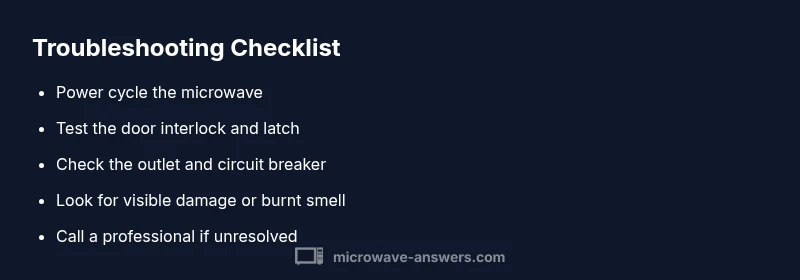
Power cycle the microwave
Unplug the unit from the wall outlet, wait 60 seconds, then plug it back in. This can clear minor control glitches that cause heating to stall while the light remains on.
Tip: This is the fastest first step and is safe to perform. - 2
Check the door interlock
Inspect the door latch and seal for wear or damage. Close the door firmly and test whether the latch engages with a satisfying click. A faulty interlock often prevents heating even when the light is on.
Tip: Never bypass interlocks; they are essential for safety. - 3
Test the outlet and circuit
Confirm the microwave outlet has power by plugging in a different device or using a multimeter. If the circuit breaker or GFCI outlet trips, reset or fix the circuit before retrying the microwave.
Tip: If you’re on a shared circuit, the load balance can affect performance. - 4
Inspect for visible damage
Look for signs of burning, melted plastic, or loose wiring around accessible panels. Do not attempt internal repairs if you see damage; power must be removed before any inspection.
Tip: Use a flashlight and wear eye protection if you see damage. - 5
Decide on professional help
If none of the above resolves the issue, magnetron or HV-related components are possible culprits. Get a professional diagnostic and a written quote before any repair.
Tip: Ask about warranty coverage and service fees up front.
Diagnosis: Microwave won't heat but light stays on
Possible Causes
- highDoor interlock or latch failure
- mediumFaulty control board or user interface
- lowBlown thermal fuse or safety cutout
- lowMagnetron or high-voltage issue
Fixes
- easyTest and reseat door interlock following manufacturer guidelines; ensure door latches securely
- easyReset the control panel by unplugging for 60 seconds and plugging back in
- easyCheck the outlet and circuit breaker; test with another device to confirm power availability
- hardIf unresolved, schedule professional service for magnetron or HV components
Common Questions
Why is my microwave not heating when the light is still on?
This usually points to a door interlock, control-board fault, or a blown fuse. Start with power cycling and door latch checks, then consult a technician if it persists.
Typically a door interlock or control-board fault. Begin with a reset and door check, and call a technician if the issue remains.
What should I check first if the microwave won’t heat?
Check the power supply (outlet and circuit), verify the door closes properly, and ensure the fuse hasn't tripped. If these pass, the problem is likely internal.
First, verify power, door latch, and fuse. If those are fine, the fault is probably internal.
Is it safe to open the microwave to inspect internal parts?
No. Interior components run at high voltage and can cause shock. Only inspect exterior parts and unplug before any action; contact a professional for internal checks.
No. Internal parts are dangerous; unplug first and call a pro for internal checks.
Can a microwave be repaired, or should I replace it?
It depends on the age, cost of repair, and warranty. Magnetron repairs are often expensive; a pro can advise whether replacement is more economical.
Repair vs replace depends on cost and age; a professional can tell you if replacement is wiser.
If power cycling doesn’t help, what’s the next step?
Schedule a professional diagnostic to test high-voltage components and control boards. Avoid DIY fixes beyond basic checks.
If cycling fails, get a professional diagnostic for HV components and the control board.
Watch Video
Main Points
- Unplug to reset the control panel.
- Prioritize door interlock tests first.
- Avoid bypassing safety interlocks.
- Call a pro for magnetron or HV issues.