What to Do If Your Microwave Is Not Heating
If your microwave won’t heat, use this urgent, step-by-step troubleshooting guide to diagnose common causes, with safe checks and when to call a pro. Get back to heating safely, fast.


Not heating is most often caused by a blown magnetron, a faulty door interlock, or a damaged high-voltage diode. Start with power and safety basics: confirm the outlet works, unplug and replug, and test with a simple cup of water. If there’s still no heat, follow the diagnostic flow below for safe, structured troubleshooting.
Not Heating? Safety-First Guide to Quick Checks
When a microwave fails to heat, the urge to force it can be strong, but safety must come first. According to Microwave Answers, most heating issues start with simple power or interlock faults rather than dramatic internal failures. The Microwave Answers team found that verifying the basics—power, door status, and basic operation—often resolves the problem without tools. This section sets the stage for a careful, safe check routine and establishes the mindset you’ll bring to every test. The goal is to determine if the issue is something you can handle safely at home or if it requires professional service. If you smell burning, hear unusual buzzing, or notice smoke, stop immediately and unplug the unit.
If you can identify and fix a basic power or door issue, you’ll save time and money and reduce risk. Remember, microwaves contain high-voltage parts even when unplugged, so never attempt to access internal components beyond what the manufacturer allows. This guide will walk you through safe steps and clearly indicate when professional help is needed.
Common Causes Behind a Non-Heating Microwave
There are several plausible culprits behind a microwave that won’t heat. The magnetron converts electricity into microwaves that heat food; if it fails, there’s no heat. The door interlock switch prevents operation when the door isn’t closed properly, so a faulty switch can stop heating altogether. Power supply issues, such as a tripped circuit breaker or damaged cord, are frequent external causes you can verify quickly. Less common, but possible, are failed high-voltage diodes, capacitors, or a damaged control board. Understanding these causes helps you decide which checks to pursue first and which require a technician. Safety note: never bypass interlocks or disassemble high-voltage parts.
Immediate Safety Checks You Can Do Without Tools
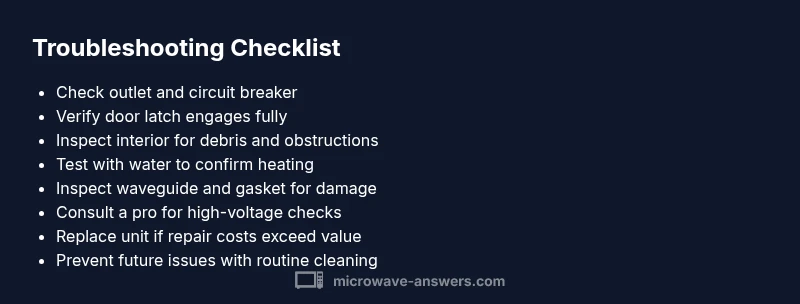
Begin with non-invasive checks to avoid electrical hazards. • Confirm the outlet works by testing another device. If the outlet is dead, reset the circuit breaker or try a different wall outlet. • Ensure the microwave is properly plugged and the cord shows no signs of damage. • Verify the door closes firmly and the latch engages. A loose door or worn latch can prevent heating. • Remove all metal objects from the interior and ensure the turntable rotates smoothly; a stuck turntable can sometimes give the appearance of not heating. • Be mindful of smells, smoke, or a buzzing sound; these indicate a problem beyond simple power issues and require professional evaluation.
How to Read the Diagnostic Clues and What They Mean
Use the symptoms you observe to narrow down causes. If the light and timer operate but there’s no heat, the issue is likely internal (magnetron, diode, or control board). If the microwave won’t turn on at all, focus on the power supply, control panel, or switch interlocks. If you hear a hum without heating, the magnetron may be weak or the waveguide could be partially blocked. Document what you observe: timing, sounds, smells, and whether heating resumes after a door closure or reset. These notes help a technician diagnose faster and avoid unnecessary disassembly. Always stop if anything feels unsafe and seek professional help when in doubt.
When to Call a Pro and What to Expect
If you’ve exhausted safe, basic checks and the unit still won’t heat, professional service is warranted. A technician can safely test high-voltage components, measure current with appropriate equipment, and verify interlock integrity. Expect to pay for diagnostic time and any component replacements. In some cases, a failing magnetron or interlock requires a part replacement and professional reassembly. Ask for a written estimate, warranty on workmanship, and evidence of proper lab certification where required. If your microwave is older, weigh the cost of repair against replacement to ensure you get the best value and safety.
Prevention Tips to Avoid Future Heating Problems
Practical care can extend the life of your microwave and keep heating reliable. • Keep vents clear of dust and debris; clean the interior with mild soap and water after cooling. • Use microwave-safe containers and avoid metal, foil, or metal trim. • Regularly inspect the power cord for signs of wear and replace damaged cords promptly. • Schedule routine maintenance checks if you rely on your microwave daily; a professional can verify safety features are intact and prevent failures. • If you notice changes in heating efficiency, address them early rather than waiting for a full breakdown.
Steps
Estimated time: 60-90 minutes
- 1
Verify power and reset
Unplug the microwave, wait 30 seconds, plug back in, and test with a simple cup of water to see if heat returns. This confirms basic power and control readiness.
Tip: If the outlet is on a dimmer or controlled by a wall switch, ensure the circuit is fully energized. - 2
Check door closure and interlock
Close the door firmly and listen for the latch engaging. If the door feels loose or the latch is worn, the unit may refuse to heat as a safety precaution.
Tip: Do not bypass the door interlock; it’s a critical safety feature. - 3
Inspect interior and turntable
Remove contents, check for obstructions, and ensure the turntable rotates freely. A stuck turntable can mirror heating issues or cause cycling faults.
Tip: Clean the interior with a damp cloth after the unit is cool. - 4
Assess visible components
Look for obvious signs of damage or burning around the interior walls, waveguide cover, or door gasket. Do not touch internal parts with the unit plugged in.
Tip: If you see burnt components, stop and call a professional. - 5
Test with a professional eye
If the problem persists, a professional should test magnetron, diodes, and capacitors using appropriate safety protocols and equipment.
Tip: High-voltage components pose shock risk even when unplugged. - 6
Make a repair or replacement decision
Based on diagnostic results and cost estimates, decide whether to replace or repair the unit. Prioritize safety and long-term reliability.
Tip: Ask for written estimates, part warranties, and safety certifications.
Diagnosis: Microwave won't heat at all
Possible Causes
- highBlown magnetron (heating element)
- highFaulty door latch or door switch
- mediumDamaged high-voltage diode or capacitor
- lowThermal fuse or temperature sensor tripped
- lowControl board fault or interlock system issue
Fixes
- easyCheck the outlet and reset the circuit breaker; try another appliance to confirm power
- mediumInspect the door latch/anti-interlock visually for wear or misalignment and replace if needed
- hardReplace the door switch or magnetron only if you have appropriate safety training and follow manufacturer guidance
- hardConsult a licensed technician to test high-voltage components and safety interlocks
Common Questions
Why won’t my microwave heat even though the light comes on?
The heating element (magnetron) or high-voltage components may have failed, or the door interlock is preventing operation. Start with power checks and door closure before considering professional service.
If the light is on but there’s no heat, the magnetron or door interlock is a likely issue; check power and door safety first.
Can a humming microwave that won’t heat be fixed at home?
Some issues are simple, like a loose door latch or power cord. Avoid opening the cabinet; rely on safety checks and professional evaluation for high-voltage parts.
A humming unit can indicate internal components wearing out, but avoid DIY fixes beyond basics.
Is it safe to inspect the interior to diagnose heating problems?
Only after unplugging the unit and letting it cool. Do not touch high-voltage parts; if you’re unsure, call a professional.
Safety first: unplug and don’t touch internal parts unless you’re trained.
How much does magnetron replacement typically cost?
Costs vary by model and region; consult a professional for an estimate. If the unit is old, replacement may be more cost-effective than repair.
Magnetron replacement costs can vary; get a quote before proceeding.
When should I replace the microwave instead of repairing it?
If major components need replacement or the cabinet is dated, replacement may offer better safety and value. Compare repair costs to a new unit.
If repairs are frequent or expensive, a new microwave is often the safer choice.
Watch Video
Main Points
- Test power and outlet first
- Never bypass safety interlocks
- Inspect door latch and interior for obvious faults
- Know when to call a professional for high-voltage components