Microwave Repair: Safe DIY Troubleshooting Guide
Learn safe, practical steps to diagnose common microwave issues at home, with essential tools, step-by-step troubleshooting, and guidance on when to call a professional.


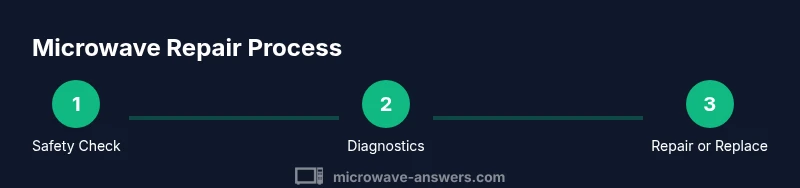
You can safely diagnose and address common microwave issues at home by unplugging the unit, inspecting the power cord for damage, testing the outlet, and consulting the owner's manual before attempting any internal work. This guide helps you distinguish minor fixes from problems that require professional service, and outlines when to repair versus replace.
What is microwave repair and when DIY makes sense
Microwave repair refers to diagnosing and addressing faults that prevent a microwave from heating properly, turning, or operating safely. For home cooks, many minor issues are fixable with basic checks and safe, non-invasive actions. The Microwave Answers team notes that most repairs involve simple fault finding, safety verification, and proper use habits rather than deep internal disassembly. In this guide, we’ll walk you through practical steps to determine whether a fault is something you can handle or a signal to call a professional. Real-world examples include a microwave that won’t heat, a door that won’t latch, or sparking due to foil inside the cavity.
Whenever you encounter a problem, start with the simplest explanation (a blocked vent or a loose plug) before moving to more complex hypotheses. This approach aligns with Microwave Answers’ guidance for safe, pragmatic troubleshooting. If the issue seems electrical or involves high-voltage components, prioritize safety and seek professional service promptly.
Understanding the limits of do-it-yourself repair helps protect your home and your appliance investment. For most households, the initial steps focus on safety, basic diagnostics, and preventive maintenance that prevent future faults.
Tools & Materials
- Screwdriver set (Phillips & flat-head)(Insulated handle preferred; ensure you have the right bit sizes for common screws on consumer microwaves.)
- Non-contact voltage tester(Use to confirm power is truly off before touching any exposed wiring.)
- Multimeter(Optional for checking continuity on simple, user-accessible components.)
- Replacement fuse (if specified in manual)(Only replace if the unit design allows user access per the manual.)
- Owner’s manual / model number(Keep handy for wiring diagrams, part numbers, and warranty terms.)
- Soft, non-abrasive cleaning supplies(Use to clean interior after inspections; never introduce liquids into electronics.)
- flashlight or headlamp(For better visibility inside the cavity during inspection.)
Steps
Estimated time: 30-60 minutes
- 1
Unplug and confirm power is off
Always unplug the microwave and wait at least 60 seconds before handling any exterior or internal components. This pause helps discharge capacitors and reduces shock risk while you inspect common external faults like damaged cords or loose plugs.
Tip: If the outlet has a GFCI, test that the outlet resets normally after unplugging the unit. - 2
Inspect the power cord and plug
Carefully examine the cable for cracks, kinks, or burn marks. A damaged cord can mimic many fault symptoms (no heat, intermittent operation) and should be replaced or professionally inspected before any further steps.
Tip: Do not attempt to tape or “patch” exposed wires; replace the cord or consult a service technician. - 3
Test the outlet with a known-good device
Plug a separate, functional appliance (like a lamp) into the same outlet to confirm the outlet supplies power consistently. If the outlet is weak or unstable, address that electrical issue first, as it can affect microwave performance.
Tip: If the outlet struggles to power a basic device, do not use the microwave until the outlet is repaired. - 4
Check for obvious internal obstructions or debris
Open the cavity only if the manufacturer permits user-access to the interior. Look for stray foil, metal trim, or crumbs that could cause arcing or uneven heating. Clean gently with a dry cloth if safe to do so.
Tip: Never use water or cleaning sprays inside the microwave while it’s unplugged. Make sure everything is completely dry before resealing the door. - 5
Inspect the door seal and latch alignment
A misaligned door or worn seal can prevent proper heating and trigger safety interlocks. Check that the door closes fully and that the gasket sits evenly without gaps.
Tip: If the door won’t close properly or the latch feels loose, stop here and seek professional service. - 6
Review the user manual for error codes
Some models display error codes when there’s a fault. Look up the code in the manual to identify the likely area of concern without opening HV components.
Tip: Note down the error code and model number before calling support or a technician. - 7
Decide between repair vs replacement based on symptoms
If the issue is heating inefficiency, arcing, or control-panel failure, internal components may require professional service. Simpler issues (drifted door, cosmetic misalignment) may be resolved with a technician’s minor adjustment or part replacement.
Tip: If in doubt, consult the manual or a licensed technician to avoid dangerous situations. - 8
Document symptoms and warranty status
Record when the fault occurs, how often it happens, and any recent changes (new cord, moved appliance). This helps a technician diagnose quickly and determine warranty eligibility.
Tip: Having your model number and purchase date handy speeds up the support process. - 9
Put safety first; seek professional help for complex faults
Certain repairs involve high voltage capacitors or control boards that require specialized training and tools. If you suspect these areas, don’t proceed—contact a qualified repair technician or the manufacturer’s service line.
Tip: Never operate a microwave that has sparked, smells burnt, or makes unusual noises while opened or partially disassembled.
Common Questions
Is it safe to repair a microwave at home?
Basic safety checks like unplugging, cord inspection, and outlet testing are generally safe for homeowners. Internal repairs involving high voltage or control boards should be performed by a qualified technician. Always refer to the manual and follow safety precautions.
Homeowners can do simple safety checks, but avoid high-voltage repairs and seek professional help for complex issues.
Can I replace a fuse in my microwave myself?
Some models allow user-accessible fuses, but many modern microwaves have sealed circuits and specific fuse ratings. Check your manual and manufacturer recommendations before attempting replacement. If in doubt, contact a professional.
Only replace a fuse if your manual clearly allows it and you know the rating; otherwise get professional help.
What symptoms indicate I should replace rather than repair?
If heating is uneven, electrical faults persist after safe troubleshooting, or the unit shows persistent arcing or burning smells, replacement is often more cost-effective and safer than a repair.
Persistent heating issues or arcing usually mean it’s time to replace rather than repair.
What tools are essential for safe DIY troubleshooting?
A basic insulated screwdriver set, a non-contact voltage tester, a multimeter (optional), and the owner’s manual are useful for safe, initial diagnostics.
Use a screwdriver set, a voltage tester, and the manual for safe basic checks.
How long does microwave repair typically take?
Times vary by fault and access to parts. Simple diagnostics can take 30-60 minutes; complex repairs or part replacements may require several hours or scheduling a service visit.
Most simple checks take under an hour; complex repairs may need a professional appointment.
Watch Video
Main Points
- Unplug before inspection and handle with care
- Check cords, outlets, and door seals for common faults
- Use manuals and error codes to guide decisions
- Opt for professional help for high-voltage or board issues
- Prevent future problems with regular, safe maintenance