Microwave Troubleshooting: Power On, Heat Off
If your microwave powers on but won’t heat, use this urgent, practical guide from Microwave Answers. Learn safety steps, checks, and when to call a pro to restore heating quickly.


If your microwave powers on but won't heat, the most likely culprits are door interlocks, a blown high‑voltage fuse, or a failing magnetron. Start with simple checks like the door latch and outlet, then move to component tests or a professional repair if heat still won't start. This quick guide helps you triage safely and quickly.
Understanding the issue: microwave not heating even though it has power
According to Microwave Answers, this scenario is one of the most frustrating because power is present but heat isn't generated. The phrase microwave not working but has power describes several failure paths, from door interlocks to HV components. Understanding the most common causes helps you act quickly without risking safety. In homes with older units, door switch wear and capacitor degradation are frequent, while newer models can fail magnetrons or control boards, leading to an oven that lights up but won’t heat.
Safety first: unplug, avoid high voltage components
Before you touch anything, unplug the microwave and disconnect it from the power outlet. Do not attempt to diagnose or test HV parts while the unit is plugged in. If you smell burning plastic, hear buzzing, or see smoke, leave the area and contact a professional immediately. For households, always keep water and metal objects away from the interior during inspection. Safety is the top priority when dealing with appliances that handle radiation and high voltage.
Quick checks you can perform without disassembly
Start with simple, non-invasive checks. Verify the outlet works by plugging in a lamp or other device. Check the door is fully closed and the latch engages; many microwaves won’t heat if the door interlock detects the door open. Confirm the turntable rotates freely and isn’t causing a jam. If the exterior display responds to controls, but the oven refuses to heat, you’re likely into a component issue rather than a user error. These checks address common causes of the pattern microwave not working but has power.
Common culprits responsible for heating failure
Most heating failures fall into a few categories: a faulty door interlock switch, a blown high voltage fuse or capacitor, a failed magnetron, or a malfunctioning control board. The door interlock is the first suspect because it stops the HV circuit from energizing even if the display shows power. A failed magnetron can be intermittent, but it often results in no heat. A control board fault can also prevent power from reaching the magnetron even when lights stay on. Diagnosis should proceed logically from doors to HV components.
How to test the door switch and interlock safely
With the unit unplugged, access the door switch and interlock housing and visually inspect for damage. Use a multimeter to check continuity across the switch when the door is closed. If the switch shows no continuity or is physically worn, replace it. Do not bypass interlocks; they are safety features. Replacement is straightforward on many models and can restore heating if the door switch was the root cause.
When to call a professional and what to expect
If the unit still doesn’t heat after replacing obvious parts, the magnetron or control board may be at fault. These are high voltage components and require specialized tools and knowledge. A licensed appliance technician can perform safe voltage tests, magnetron replacement, and board diagnostics. Expect some diagnostic time and a range of repair costs depending on parts and labor.
Prevention tips to extend microwave life
Regular cleaning, avoiding metal objects, and using only microwave-safe containers reduces wear on the door interlock and interior components. Keep the interior dry and free of food debris to prevent arcing. If your unit is older than 8-10 years, plan for eventual parts availability and consider a replacement if heat problems become frequent. Maintaining a calmer usage pattern also minimizes stress on HV parts.
Diagnostic flow overview
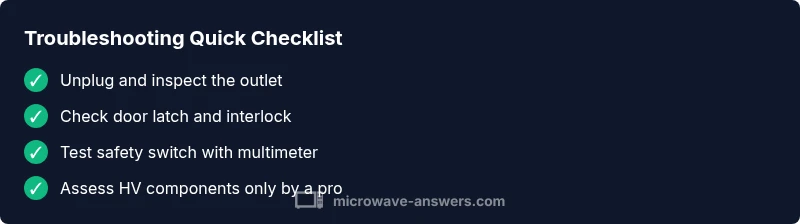
This section provides a practical map for diagnosing a microwave that powers on but won’t heat. Start with the simplest checks (door latch, outlet, fuse) and escalate to door interlocks, then HV components (diode, capacitor, magnetron) and finally the control board. After each fix, test heating with a small cup of water. If heat returns, you’ve found the culprit; if not, log your repair steps and consult a professional.
Steps
Estimated time: 30-60 minutes
- 1
Power down and unplug
Always unplug the unit before inspecting any internal parts. Wait a full minute to dissipate any residual charge, then replug to test basic functions safely if applicable.
Tip: Use dry hands and stand on a non-conductive surface. - 2
Test the outlet and circuit
Plug a lamp into the same outlet or reset the household circuit to ensure the outlet actually has power. A tripped breaker is a common reason for no heat with power still present on other features.
Tip: If your outlet is controlled by a wall switch, ensure the switch is ON. - 3
Inspect the door latch
Open and close the door several times to feel for unusual resistance and verify the latch engages. A worn switch can prevent the HV circuit from energizing even when the display is lit.
Tip: Do not bypass interlocks; they are vital for safety. - 4
Check the door interlock continuity
With the unit unplugged, access the interlock and use a multimeter to check continuity across the switch when the door is closed.
Tip: If continuity is inconsistent, replace the switch. - 5
Assess HV components
If door switches check out, refer to the model manual to locate the HV fuse/capacitor and magnetron, and determine safe replacement steps or testing methods.
Tip: High voltage components should be handled only by trained technicians. - 6
Test heating after fixes
Reconnect power and run a short heating test using a microwave-safe cup of water to verify heat generation.
Tip: If there is no heat after these steps, schedule professional service.
Diagnosis: Microwave turns on (lights/beeps) but does not heat
Possible Causes
- highPower outlet or circuit issue
- highDoor interlock switch faulty
- mediumBlown high voltage fuse or capacitor
- mediumMagnetron failure
- lowControl board fault
Fixes
- easyVerify outlet is delivering power; try a different outlet or reset the circuit breaker
- easyInspect door latch and interlock; replace if worn or damaged
- mediumTest/replace high voltage fuse or capacitor as advised by model manual
- hardAssess magnetron; replacement should be performed by a pro
- hardCheck control board for burnt components or failed relays; professional repair recommended
Common Questions
Why is my microwave turning on but not heating?
This commonly points to a door interlock issue, a blown HV fuse, or magnetron failure. Start with simple checks before advancing to component tests.
If your microwave turns on but won’t heat, check the door interlock first, then the HV fuse or magnetron. Start with simple checks.
Can I fix it myself if it doesn't heat?
Some tasks like door latch replacement or outlet verification are safe. HV components and magnetron testing should be done by a professional.
Some fixes like door latch replacement are safe, but HV parts should be handled by a pro.
Is there a quick home fix I can try?
Check the door fully closes, reset the circuit, and verify the outlet. Avoid opening HV areas; do not bypass safety interlocks.
Try the door latch and outlet checks first; don’t bypass safety parts.
How long do microwave repairs take?
Service duration depends on part availability and the issue. A technician may need to diagnose and replace components, potentially taking a few hours.
A repair can take a few hours depending on the parts and diagnosis.
When should I replace instead of repair?
If heat problems recur or the unit is very old, replacement is often more cost-effective and safer than ongoing repairs.
If heat problems keep returning or the unit is old, consider replacing it.
Watch Video
Main Points
- Unplug before any inspection or repair
- Start with door latch and outlet checks
- Progress to HV components only with professional help
- Document repairs and test results for future safety