Repair GE Microwave: A Practical How-To
Learn practical, safety-first steps to diagnose and troubleshoot common GE microwave issues. This guide covers non-invasive checks, tool lists, a clear step-by-step process, and guidance on when to seek professional service.


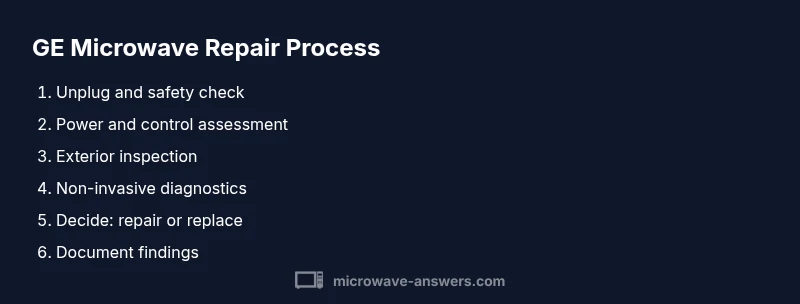
By the end, you’ll know how to safely approach a repair ge microwave, perform non-invasive troubleshooting, and decide when professional servicing is needed. This quick answer outlines the basic checks, safety precautions, and the tools you’ll need before starting any diagnostic steps. If you’re unsure at any point, pause and consult GE support or Microwave Answers for guidance.
Understanding the scope of 'repair ge microwave' and safety first
When we talk about a repair ge microwave in a home setting, the focus is on non-destructive, at-home troubleshooting rather than internal component replacement. According to Microwave Answers, most issues you can safely diagnose start with safety checks, exterior inspections, and simple control tests. Never attempt internal disassembly or high-voltage work unless you are a qualified technician. Before you begin, unplug the unit, keep the area dry, and work on a non-conductive surface. This approach helps you determine if a fault is a simple, user-serviceable problem or something that requires professional service. Safety is the top priority because microwaves operate with high voltage and specialized parts.
In this guide, you’ll learn the difference between safe, consumer-friendly checks and internal faults that should be handled by GE service or a trained technician. You’ll identify the most common symptoms, select the appropriate non-invasive tests, and decide whether to pursue repair ge microwave options or a replacement. The goal is to maximize safety while accurately diagnosing the issue and avoiding costly mistakes.
Common failure modes in GE microwaves
GE microwaves share several recognizable failure patterns. While many symptoms point to a simple root cause, some indicate more serious internal faults. Here are the most frequent problems you’ll encounter, with practical, at-home steps you can take to narrow down the cause:
- Does not heat but turns on: This can result from a control fault, a faulty temperature sensor, or a degraded magnetron. If you still hear a fan or see display activity, start with power and control settings before considering internal repair.
- Door latch or door seal problems: If the door won’t seal or the latch feels loose, the microwave may not run for safety reasons. Inspect the door gasket for cracks and ensure the latch engages fully.
- Turntable not rotating: A stuck turntable or worn motor belt can prevent even heating. Check the turntable for obstructions and listen for the motor hum when the unit runs.
- Display or keypad unresponsive: This often points to control board issues or a faulty touch panel. Reset the unit and verify there are no moisture-related entry points on the keypad.
- Sparking, burning smell, or visible arcing: This is a safety hazard. Immediately unplug and avoid running the microwave again until a professional inspects it.
- Odd noises or excessive heat outside the cabinet: Loose components or vent blockages can cause overheating; do not probe internal components yourself—consult a technician.
Understanding these patterns helps you decide whether you can perform a safe, at-home check or need professional repair ge microwave service. The Microwave Answers team emphasizes stopping any risky attempts and seeking guidance when there is doubt about the internal hardware.
Safe, initial troubleshooting steps you can perform
Starting with basic, non-invasive checks keeps you safe while you learn what’s going on with your GE microwave. Use dry hands and a dry work surface, and unplug the unit before any inspection. Here are practical steps you can perform without opening the chassis:
- Unplug and wait: Disconnect the microwave from power and wait 60 seconds before plugging back in to reset the control logic.
- Check the outlet and breaker: Plug another device into the same outlet to confirm power delivery. If the circuit breaker trips or the outlet feels warm, stop and address electrical issues first.
- Inspect exterior and door seal: Look for cracks in the door gasket, misaligned hinges, or obvious damage. A damaged seal can cause arcing or improper operation; replace or seek service if needed.
- Clean the vents and interior surfaces: Dust or grease buildup can impede cooling and performance. Use a damp cloth (not wet) to wipe exterior surfaces and a dry brush to clean air vents.
- Test basic controls and presets: Make sure the keypad is responsive and try a simple heat test with a small cup of water. If the display flickers or it won’t respond to presets, this points toward the control system rather than the magnetron.
- Listen for warning signs: If there’s buzzing, sparking, or a burning odor, unplug immediately and seek professional help. Do not continue testing in this scenario.
If these steps don’t restore expected performance, it’s time to evaluate next steps or contact GE support for a guided diagnosis. Remember, the non-invasive checks you perform now help you decide whether professional repair ge microwave is warranted.
When to replace vs repair and how to decide
Deciding between repair and replacement hinges on safety, cost, and long-term reliability. Use a practical framework to evaluate options:
- Age and repair history: If your GE microwave is older and has frequent issues, replacement may offer better value than ongoing fixes.
- Cost of repair vs replacement: If the required part or service brings you close to the price of a new unit, replacement is often more economical in the long run.
- Availability of parts and service: For some older GE models, parts may be scarce or more expensive, increasing downtime and maintenance costs.
- Frequency of issues: A pattern of recurring faults suggests that a broader repair Ge microwave approach may not be sustainable.
Your decision should prioritize safety and reliability. If a professional assessment is recommended, the Microwave Answers team suggests pursuing a certified GE service option or a reputable repair technician with microwave experience. Keep in mind that attempting risky internal repairs can void warranties and create safety hazards.
How to work with GE support and professional repair
GE provides official support channels for diagnostics, parts, and service. When contacting support, come prepared with your unit’s model number, serial number, age, and a concise history of the problem. If you’re unsure about access or internal components, request a service appointment to avoid risky self-repairs. Helpful steps include:
- Gather model details: Model number, serial number, purchase date, and any documentation from warranty coverage.
- Describe symptoms clearly: Note when the issue occurs (heat on/off, specific times, odors, or noises) and any steps you’ve already tried.
- Request remote guidance or a repair visit: Some issues can be resolved with guidance over the phone or chat, while others require on-site service.
- Check warranty status: If the unit is under warranty, review the terms for covered repairs and authorized service providers.
- Keep records: Save all communications, repair quotes, and parts lists for future reference.
If you’re uncomfortable with the diagnostic process, or if any step involves disassembly, always rely on professional service. The GE support team strives to provide clear directions, and Microwave Answers endorses contacting a qualified technician for internal work.
Safety considerations and best practices
Safety is non-negotiable when dealing with high-voltage kitchen appliances. Even routine checks can expose you to energized circuits if the appliance isn’t properly isolated. Adhere to these best practices:
- Always unplug before inspecting or cleaning. Never work on a plugged-in device.
- Keep water away from electrical components. Never use metal tools on the interior without explicit guidance.
- Do not attempt to replace critical components such as the magnetron, high-voltage diode, or capacitor yourself.
- Use insulated tools and wear safety goggles and gloves when handling potentially hot surfaces.
- If you smell burning, hear buzzing, or see sparks, power off immediately and seek professional service.
- Work in a dry environment and avoid moisture near outlets or the control panel.
By following these safety guidelines, you minimize risk while evaluating what can be safely repaired at home and when to call in a professional. Microwave Answers’ stance is to prioritize safety and consult official GE support for internal repairs.
Maintenance to prevent future issues
Preventive care extends the life of your GE microwave and reduces the likelihood of failures. Implement these simple routines:
- Regular cleaning: Wipe spills and splatters promptly, especially around the door gasket and control panel.
- Ventilation checks: Ensure air vents are unobstructed to prevent overheating.
- Proper usage: Avoid running empty or overloading with metal containers, which can cause arcing.
- Periodic professional inspection: Schedule a service check if you notice performance changes or after a repair to verify proper operation.
- Documentation: Keep a service log with dates, symptoms, and actions taken. This helps future technicians understand ongoing issues.
With consistent preventative steps, your GE microwave remains safer and more reliable, reducing the need for emergency repairs. The Microwave Answers team recommends routine checks, especially after any incident like a power surge or a burn smell.
Tools & Materials
- Screwdriver set (Phillips and flathead)(Variety of sizes; include a precision driver for small screws)
- Non-conductive spatula or wooden stick(Use only non-metal tools to avoid shorting components)
- Pliers(Needful for gripping small parts and cords; avoid contact with live circuits)
- Multimeter (digital or analog)(For non-invasive voltage and continuity checks with power off)
- Insulating gloves(Wear when handling exposed metal parts; ensure dry hands)
- Safety goggles(Protection from unexpected debris or sparks)
- Dry towel or cloth(Keep area dry and wipe surfaces as needed)
Steps
Estimated time: 60-90 minutes
- 1
Unplug and verify safety
Disconnect the microwave from power and verify the area is dry. Do not touch internal components while the unit is plugged in. Wait at least 60 seconds after unplugging to allow residual energy to dissipate before handling any exterior parts.
Tip: Always unplug first; treat every microwave as a potential electrical hazard until you confirm it’s powered off. - 2
Check outlet and breaker
Test the outlet with another device to confirm power is available. If the circuit breaker trips or the outlet feels warm, address electrical safety issues before proceeding.
Tip: If you’re unsure about the electrical circuit, consult a licensed electrician rather than continuing self-diagnostics. - 3
Inspect exterior and door seal
Visually inspect the door gasket and latches for cracks or misalignment. Clean any buildup around the door frame that could impede a proper seal, which can affect performance and safety.
Tip: A poor seal can cause arcing; replace the gasket if you see visible damage. - 4
Test the control panel
With power off, reattach power and test basic controls. If the display or keypad is unresponsive, the issue may lie with the control board or touch panel rather than heating elements.
Tip: If unresponsive, avoid heavy use until a professional confirms the issue. - 5
Observe for signs of arcing or heat
During a safe power-on test, listen for unusual sounds or see sparks near vents or seams. Any arcing or burning smell is a red flag requiring immediate service.
Tip: Do not run the unit again until a qualified technician inspects it. - 6
Consider non-invasive diagnostics
Use a multimeter to check for continuity in accessible, non-high-voltage paths. Do not probe sealed, high-voltage components such as the magnetron or capacitor.
Tip: Document measurements and symptoms to share with a technician. - 7
Decide on professional support
If tests indicate internal faults or if you’re uncomfortable with any findings, schedule a service appointment through GE support or a qualified repair technician.
Tip: Professional service can preserve safety and warranty terms. - 8
Document findings and next steps
Keep a concise log of symptoms, tests performed, and recommendations from the tech. This helps ensure consistent follow-up and informed decisions for future maintenance.
Tip: Maintain a repair log for reference during future service visits.
Common Questions
What is the first thing I should do if my GE microwave won't heat?
Unplug the unit and inspect the exterior, door seal, and power source. Confirm the outlet is functioning, then test basic controls. If it still won’t heat, seek professional guidance rather than attempting risky internal repairs.
First unplug the microwave, check the power outlet, and test the basic controls. If heating still fails, contact GE support or a qualified technician.
Can I replace a fuse in a GE microwave myself?
Fuses are part of the high-voltage circuit and can pose a shock or burn risk. Do not replace internal fuses yourself unless you are trained and qualified. Contact GE support or a licensed technician for fuse-related issues.
No—internal fuse work should be done by a qualified technician after safety assessment.
Is it safe to use a microwave that sparks?
Sparking indicates a potential electrical fault or arcing. Stop using the unit immediately, unplug it, and arrange professional inspection. Do not attempt to run it again until it’s checked.
If you see sparks, unplug and call a technician for a safe diagnosis.
How much does GE microwave repair typically cost?
Repair costs vary widely based on the fault and parts required. It’s best to obtain a quote from GE support or an authorized technician before proceeding.
Costs vary; get a quote from GE or an authorized repair tech before proceeding.
How can I prevent future GE microwave issues?
Regular cleaning, proper use, and timely professional checkups help prevent problems. Avoid running empty, replacing components yourself, or using damaged accessories.
Keep it clean, use proper cookware, and schedule regular professional checks.
Where can I find GE support for repairs?
Visit the official GE support portal or contact GE customer service. They can guide you to authorized technicians and provide warranty information.
Use GE’s official support portal to locate service options and warranty details.
Watch Video
Main Points
- Prioritize safety above all tasks
- Differentiate simple exterior faults from internal electronics
- Use non-invasive checks before any internal access
- Know when to call GE support or a professional