How to Get Microwave Out of Child Lock Panasonic: A Practical Guide
Learn how to get microwave out of child lock Panasonic models with a practical, safety-focused approach. Identify lock types, apply model-specific unlock methods, and prevent future lockouts with expert tips from Microwave Answers.


This guide shows you how to get microwave out of child lock Panasonic models safely. You’ll learn how to identify lock indicators, what two-button unlock sequences often apply, how to reset via power cycle, and when to consult the manual or Panasonic support for model-specific steps.
Understanding how to get microwave out of child lock Panasonic
For many home cooks, the term 'child lock' on a Panasonic microwave sounds like a hard barrier. Understanding how to get microwave out of child lock Panasonic starts with recognizing why these safety features exist. According to Microwave Answers, child locks are designed to prevent accidental operation when curious hands are near the keypad, the door, or the turntable. They can be triggered by a mistaken sequence, a spill of liquid on the keypad, or simply by confusing the settings during a busy morning. In practice, the lock usually manifests as a steady lock icon on the display, or a message such as 'Lock' or 'Child Lock' that remains visible even when you press buttons. The goal is not to force a 'hack' but to follow the correct unlock sequence for your specific model, which helps protect the appliance and your household. This section outlines how to identify the lock type on Panasonic units and what to expect during the recovery process.
Common Panasonic lock types and how to spot them
Panasonic microwaves commonly implement two broad approaches to the child lock: a dedicated lock button or a keypad-based memory lock. In some models, a small lock icon appears on the display and a long press on the dedicated 'Child Lock' button clears the state. In others, the system is unlocked by a two-button combination (for example, Stop/Reset plus Start) held for several seconds. Some units require a power-cycle reset to clear the memory after unlocking. Because model variations exist, locating the user manual for your exact model is essential. If you can't locate the manual, a quick search on Panasonic’s support site with your model number often yields model-specific unlock instructions. Recognizing the indicator on the display helps you decide which path to take next.
Non-invasive unlock methods and why they matter
Before attempting anything invasive, try non-destructive methods that preserve the internal circuitry. The simplest step is a power cycle: unplug the microwave, wait 60 seconds, then plug it back in and test the keypad. If your model supports it, use the dedicated 'Child Lock' button or the two-button unlock sequence and hold the buttons gently for a few seconds until the lock indicator clears. Some units also clear the lock when you press the same button twice or combine a short sequence with a tactile keypad press. It’s important to avoid pressing too hard or shoving buttons beyond their tactile feedback, which can trigger a fault or damage the keypad. After performing these steps, re-test every function—start, timer, and quick-cooking programs—to confirm the lock is fully released.
If the lock persists: model-specific steps and when to call support
If the lock remains after power cycling and a standard two-button unlock attempt, consult the model-specific instructions. Your Panasonic manual will provide the exact button sequence, hold duration, and any prerequisites (door closed, keypad idle, etc.). When in doubt, contact Panasonic support or your retailer’s service line. Do not attempt to bypass safety features by prying or disassembling the control panel, as this can void warranties and create electrical hazards. If the unit is under warranty, note the model number, serial, and purchase date before calling. A technician may need to inspect the control board for stuck relays or a faulty lock sensor. In the meantime, avoid using the microwave until you have a clear unlock path.
Prevention: safe-use habits to avoid future lockouts
To minimize future lockouts, train household members to use the keypad intentionally and keep liquids away from control surfaces. Wipe spills promptly and dry the keypad thoroughly to prevent residue from triggering the lock. Consider placing the microwave in a location where little hands can reach the control panel without triggering locks unintentionally. Regular maintenance checks, such as ensuring the door latch is clean and the screws are tight, help stop false alarms. Finally, bookmarking Panasonic’s support page for your model lets you quickly retrieve unlock instructions if needed.
Troubleshooting edge cases and safety reminders
Some Panasonic microwaves display 'Lock' when a fault is detected rather than a user-initiated lock. In these cases, the fix may be broader than unlocking, requiring service for a potential door switch fault or keypad short. If you are unsure, pause usage, unplug, and schedule a professional inspection. Remember, safety first: never bypass door interlocks or attempt to disassemble the door or control circuitry. This protects you and your family from electric shock and fire risks.
Summary: your secure path back to normal operation
With patience and the right model-specific steps, you can restore normal operation after a Panasonic child lock. Always start with the basics: identify the lock type, attempt a safe power cycle, and only then progress to a two-button unlock sequence if supported. Keep the user manual handy and record the unlock steps for future reference. Following a careful, model-aware approach reduces the chance of damage and saves time in busy kitchens.
Safety and reliability: the right mindset for microwave care
This guide emphasizes that the best path to reliable performance is a cautious, informed approach. If you rely on the appliance daily, keep it in a clean, dry environment and avoid spill-prone settings. The Panasonic lock feature is a built-in safety net; treat it with respect and learn your model’s protected sequences. With the right knowledge, you can safely get microwave out of child lock Panasonic and return to everyday cooking tasks.
Tools & Materials
- Panasonic microwave user manual(Use model-specific unlock instructions; locate model number if needed)
- Clean, dry towel(Useful for wiping the keypad and preventing residues)
- Unplugged power source (wall outlet)(Used for a safe power-cycle reset)
- Stable surface and clear area(Ensure space to manipulate controls safely)
- Panasonic support contact (optional)(Have model/serial ready if you call for help)
Steps
Estimated time: 15-40 minutes
- 1
Power down and unplug
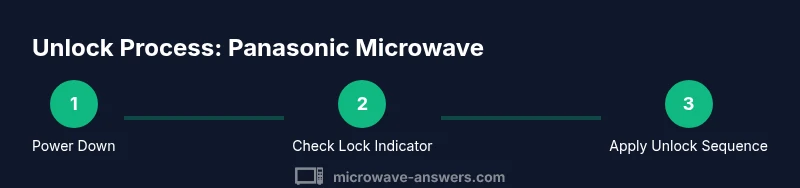
Unplug the microwave from the wall outlet and wait at least 60 seconds to allow stored memory to clear. This safe reset can clear many simple lock states without opening the unit.
Tip: Label the outlet if you have multiple devices nearby to avoid re-plugging the wrong plug. - 2
Inspect the control panel for a lock indicator
Look at the display for a lock icon or a message such as 'Child Lock.' Identifying the correct indicator helps you choose the right unlock path per model.
Tip: If the screen is dim, use a flashlight to read any tiny icons. - 3
Try a dedicated/three-button unlock path if present
If your model has a dedicated 'Child Lock' button, press and hold it for a few seconds until the indicator disappears. Some models require a two-button combination instead, so refer to your manual for the exact sequence.
Tip: Don’t press buttons with excessive force; prolonged pressure can trigger fault indicators. - 4
Attempt a two-button unlock sequence if available
If your model uses a two-button unlock, press the required pair and hold for several seconds as described in the manual. Ensure the door is closed and the keypad is idle before starting.
Tip: If you see no change after a couple of tries, stop and check the manual or support resources for your model number. - 5
Power cycle again and verify keypad responsiveness
Plug the unit back in, wait a moment, and test the keypad by selecting a simple program to ensure the lock is fully released.
Tip: Test multiple functions (start, timer, quick-cook) to confirm full restore. - 6
If still locked, contact support or consult manual
If unlock steps fail, consult the model-specific instructions or contact Panasonic support. Do not disassemble or bypass safety features.
Tip: Have model number, serial, and purchase date handy when you call.
Common Questions
Why won't my Panasonic microwave unlock after a child lock is activated?
The cause is often a model-specific unlock sequence or a temporary memory lock. Start with a safe power cycle and check for a dedicated lock button or two-button sequence in the manual. If unresolved, consult Panasonic support.
Locks usually clear with a model-specific unlock sequence or a power reset. Start with a safe power cycle and check the manual, then contact support if needed.
Is unplugging the microwave enough to reset the lock?
Unplugging can reset memory in many models, but some Panasonic units require a specific unlock sequence. Always perform a power cycle and then attempt the model-recommended action.
Yes, a power cycle often clears the lock, but some models need a special unlock sequence after replugging.
Can I unlock a Panasonic microwave with the door open?
For safety, never operate the microwave with the door open. Unlock attempts should be performed with the door closed and the unit powered as directed by the manual.
Never try to unlock while the door is open; keep the door closed and follow the manual.
What should I do if the keypad is unresponsive after unlocking?
If the keypad remains unresponsive, power cycle again, verify the two-button sequence (if applicable), and consult the manual. If still failing, contact Panasonic support.
If the keypad stays unresponsive, retry the basic steps and contact support if needed.
How do I re-enable the child lock after finishing?
Follow the model-specific steps in your manual to re-activate the child lock, usually by pressing and holding a lock button or button pair.
To re-enable, use the exact sequence in your manual or contact support for model-specific instructions.
What if the lock is caused by a fault rather than user action?
If a fault is suspected, stop using the unit and arrange diagnostic service. A door switch or keypad fault requires professional inspection.
If you suspect a fault, stop using the unit and seek professional inspection.
Watch Video
Main Points
- Identify the lock type before acting
- Use safe power-cycle resets first
- Follow model-specific unlock sequences when available
- Do not bypass safety features or disassemble the unit
- Keep model information handy for quick support