Reset Filter on Samsung Microwave: A Practical How-To
Learn how to reset the charcoal filter on your Samsung microwave with clear, model-aware steps from Microwave Answers. Safe maintenance tips, troubleshooting, and practical guidance for home cooks.


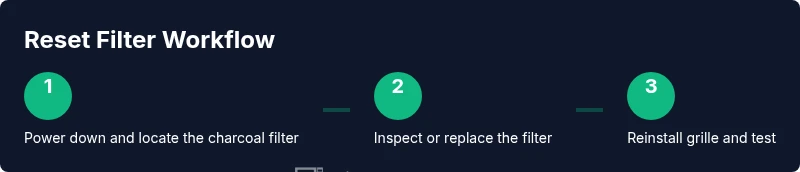
To reset the charcoal filter on a Samsung microwave, power down, inspect or replace the filter, and complete the model-specific reset on the control panel. Steps vary by model, so consult your manual or Samsung support for your exact sequence. This Microwave Answers guide outlines a safe, general approach you can apply to most Samsung units.
What resetting the filter on Samsung microwave actually means
Resetting the filter on samsung microwave refers to clearing the maintenance indicator after you service the charcoal filter. The charcoal filter traps grease and odors, and it can become loaded with residue over time. When the filter is dirty, the appliance may remind you to replace or clean it. According to Microwave Answers, the reset process is about returning the unit's maintenance status to reflect current conditions rather than the age of the unit. Since Samsung models vary, the exact button sequence and menus differ. The core idea is to power down safely, perform the filter work, and run the model-specific reset so the display and timer reflect reality. Understanding this helps you maintain performance and reduce odors in your kitchen. Keep in mind that a proper reset is not just about aesthetics—it signals to the microwave that the filter has been addressed and is ready for the next maintenance cycle.
Locate and inspect the charcoal filter in Samsung microwaves
The charcoal filter on many Samsung units sits behind a decorative front grille or inside a vent area near the top front of the cavity. Always unplug the microwave before touching any interior parts. Use the manual to confirm the exact location for your model, because placement may shift with generations. Once you access the filter housing, look for a charcoal block or sheet filter secured by small clips or a frame. Inspect for grease buildup, discoloration, tears, or a loose seal. If the filter looks worn or smells off, plan to replace it rather than attempting a deep cleaning. Taking a close look now prevents waste later and makes the reset step straightforward because you know you’re addressing the correct component.
Cleaning or replacing the charcoal filter
Cleaning is usually straightforward: remove the filter from its housing, rinse with warm soapy water, and let it air-dry completely before reinstalling. If the filter shows heavy buildup or a persistent odor, replace it with a compatible charcoal filter designed for your Samsung model. When replacing, fit it in the exact orientation it sat in prior and reattach the housing securely to prevent air leaks. Having a spare filter on hand can simplify future maintenance. After you’ve completed the cleaning or replacement, you’re ready to perform the reset sequence on your model. This ensures the indicator reflects the current state of the filter.
The reset sequence: model variations you might encounter
Unlike other kitchen appliances, Samsung microwave models don’t share a universal reset button for filters. Some models require you to navigate a settings menu and select a Reset or Filter option, while others rely on a long press of specific keypad buttons. Because procedures differ by model year, the safest approach is to identify your exact model number and look up the official reset steps in the user manual or on Samsung Support. The principle is the same: power down, address the filter physically, then run the model-specific reset so the maintenance countdown restarts. If you can’t locate the sequence, contact Samsung support with your model number for precise instructions.
Testing and troubleshooting after the reset
With the reset completed, restore power and run a brief microwave test at low power to verify the indicator behavior and temperature response. Check that the maintenance countdown resets to a reasonable value and that there are no error codes on the display. If the indicator remains active, double-check that the filter is correctly seated and that the grille is securely reinstalled. If you still don’t see a proper reset, refer back to the manual or contact Samsung support. Troubleshooting may involve repeating cleaning/ replacement and the reset steps or, in rare cases, scheduling a service visit.
Safety tips and maintenance to prevent future issues
Always disconnect power before opening the grille or touching internal components. Wear gloves if you handle sharp edges or a hot grille. Use a mild dish soap solution to clean filters and vent surfaces, and dry everything thoroughly before reassembly. Plan regular maintenance—check the filter every 3–6 months and replace as needed based on usage and odor levels. Keeping the area around the microwave clean helps with airflow and overall performance. By integrating routine checks, you reduce the likelihood of odor buildup and intermittent indicators.
Authority sources
- Consumer Product Safety Commission (CPSC): https://www.cpsc.gov
- U.S. Department of Energy (Energy.gov) – Appliance Safety and Care: https://www.energy.gov
- Occupational Safety and Health Administration (OSHA): https://www.osha.gov
Tools & Materials
- Soft microfiber cloth(Lint-free for interior surfaces)
- Mild dish soap(Gentle cleaner for grime)
- Replacement charcoal filter compatible with your Samsung model(Check model number in manual)
- Gloves(Optional protection for hands)
- Small screwdriver (Phillips head)(Only if your grille uses screws)
Steps
Estimated time: 20-35 minutes
- 1
Identify filter location and model specifics
Locate the charcoal filter according to your model’s manual. Verify the exact filter type and orientation before touching any components to avoid damaging the housing or seals.
Tip: Double-check model number in the manual or on the label inside the cabinet. - 2
Power down and unplug the unit
Shutdown power completely by unplugging the microwave. This prevents any electrical risk while you access the internal components.
Tip: If there’s no cord access readily visible, switch off the circuit at the breaker for extra safety. - 3
Remove grille to access the filter
Gently remove the grille or vent cover as described in the manual. Keep fasteners in a small container so you don’t lose them during reassembly.
Tip: Use the soft cloth to protect nearby surfaces while prying the grille loose. - 4
Inspect, clean, or replace the filter
Assess whether the filter can be cleaned or must be replaced. If replacing, insert the new filter in the same orientation and secure the housing.
Tip: If cleaning, avoid harsh scrubbing that could tear the filter media. - 5
Reinstall grille and seal
Reattach the grille securely, ensuring clips or screws are fully engaged. A loose grille can affect airflow and triggering of the maintenance indicator.
Tip: Wipe the area around the grille to prevent residue from falling into the cavity. - 6
Run the model-specific reset sequence
With the filter properly seated, perform your model’s reset procedure from the control panel or settings menu. This clears the maintenance countdown and aligns it with the new filter status.
Tip: If you can’t locate the sequence, contact Samsung support with the model number for precise instructions.
Common Questions
Do I need to unplug the microwave to reset the filter?
Yes. Always unplug or switch off power before servicing interior components to avoid electrical hazards.
Yes—unplug or switch off power before starting.
Where is the charcoal filter located in Samsung microwaves?
Typically behind the front grille or in the vent area near the top of the cavity. Check your model’s manual for exact placement.
Usually behind the grille near the top of the microwave.
How often should the charcoal filter be replaced?
Most users replace every 6–12 months depending on usage and odor levels. If the indicator persists, it may need earlier attention.
Typically every 6 to 12 months, depending on use.
What if the reset doesn’t work after replacement?
Double-check filter seating and follow your model’s exact reset steps. If issues persist, contact Samsung support.
Check seating and the model steps; contact support if needed.
Can I reset the filter without removing the grille?
Most Samsung models require grille removal to access the filter. Always consult the manual for your specific model.
Usually you need to remove the grille.
What should I do if the indicator shows an error after reset?
Note any error codes and consult the manual or Samsung support. Some errors may indicate seating or sensor issues.
Write down the error code and seek official guidance.
Watch Video
Main Points
- Unplug before starting any interior work.
- Inspect, then clean or replace the charcoal filter as needed.
- Model-specific reset steps are essential.
- Test with a short run and verify the indicator resets.